

F03 — Variable product flyer
A shop’s marketing manager picks up to nine products from the catalogue and writes two lines about the campaign; Madoo returns an A4 flyer ready to send on WhatsApp, as a PDF and as an image: a header with copy and a photograph made by the AI, and product cards printed from the catalogue with prices, sales and availability exactly as they are in the store.
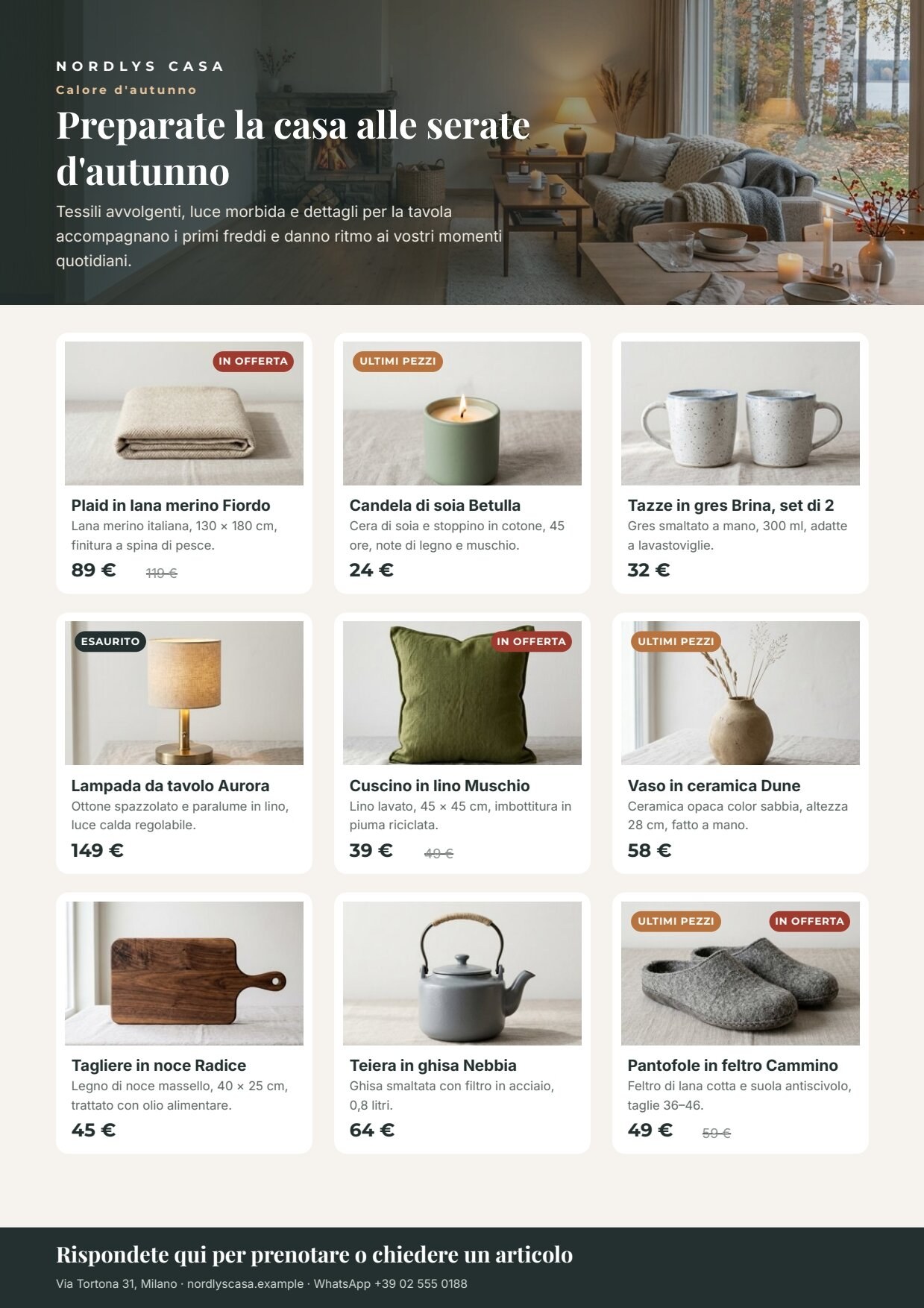
A reference run: 39 seconds, 5.04 credits. PDF — clickable: each card opens the product in the store, the call to action opens WhatsApp, the contact the website · the AI copy · header photograph · layout report.

The case
Section titled “The case”From the catalogue to a campaign shared on WhatsApp, with product content built only from store data and authorised photos. Nordlys Casa (fictional), a Milan homeware shop, launches its autumn selection to the customers subscribed to its WhatsApp channel.
| Input | Who provides it | In the workflow |
|---|---|---|
| Campaign brief | marketing, in plain words | Campaign brief (text, with a default value) |
| Selected products | the store: name, description, price, full price when on sale, stock, photo | Selected products (JSON, 0 to 9 products) |
| Shop contact | the shop’s details | Shop contact (text) |
The product photos are the ones the shop already has: a consistent set (same background, same light) made once as the example’s starting data.
What it shows
Section titled “What it shows”- The catalogue is the truth. Names, descriptions, prices, full prices and stock go from the store to the template without passing through a model: they cannot be rewritten, rounded or invented. The AI writes only the header (label, title, introduction, call to action) and the atmosphere photograph; its instructions forbid naming products, prices or discounts. See Templates in workflows.
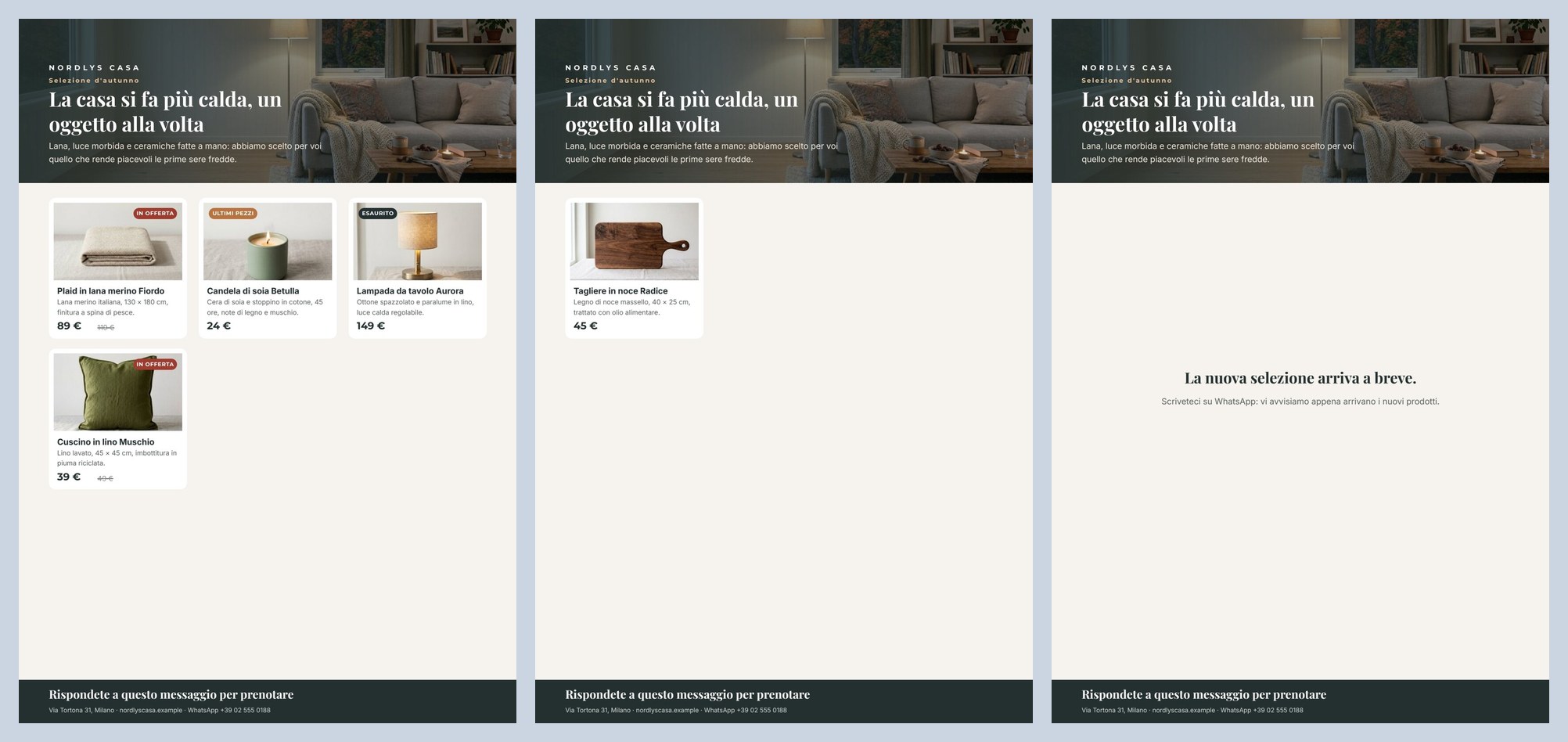
- The page reacts to the data. No variants are prepared by hand: each card reads its own product. Sold out when stock is 0, Last pieces from 1 to 3, On sale and the struck-through full price only when there is a full price. An empty selection shows a waiting message; more than nine products stop the render with a clear error instead of printing a wrong page. See Conditions, links and formats.
- Every text takes the space it needs. Header and cards are flowing Layouts: a two-line title pushes the header block up, a two-line product name lengthens its card and the grid row follows. See Flowing layouts.
The template
Section titled “The template”A4 portrait, one page; Playfair Display for titles, Montserrat for labels and prices, Inter for text; ink #23302f,
paper #f6f3ee, clay #b8733f, sale red #9f3a2e.
| Area | Content | How it is built |
|---|---|---|
| Header | brand, label, title (1–2 lines), introduction (up to 3) | a fixed Layout 196 pt tall with alignment end, so the texts sit at the bottom; the photograph header_image (fill) and a veil graded from the left are its background layers (Images) |
| Grid | up to nine cards, three per row | repeat products in grid mode (3 columns), maxItems: 9, beyond that an error (overflowPolicy: fail) |
| Card | photo, name, description, price, struck-through full price | a Layout with a rounded white background; inside, the photo (item.image, fill) and a text Layout: name and description up to 2 lines each, a horizontal price row. Prices are number fields formatted it-IT in EUR with the symbol (89 €). The whole card links to https://nordlyscasa.example/p/{item.sku} |
| Badges | Ultimi pezzi (last pieces), Esaurito (sold out), In offerta (on sale) | small Layouts with a rounded background, each with a condition: item.stock > 0 and ≤ 3; item.stock ≤ 0; item.compare_at_price present |
| Empty state | La nuova selezione arriva a breve. (“The new selection is coming soon.”) | two texts with the condition not (products present) |
| Bottom band | call to action, contact | fields cta (AI) and contact; the call to action links to https://wa.me/39025550188, the contact to the website |
| Field | Type | Required | Comes from |
|---|---|---|---|
campaign_label, headline, intro, cta |
text | yes | the AI’s JSON, validated (the data port) |
header_image |
image | yes | the generated photograph (its own port) |
products |
list of { name, description, price, compare_at_price, stock, sku, image } |
no — when absent, the empty state shows | the Selected products input |
contact |
text | yes | the Shop contact input |
Design choices worth copying:
- Keys declared on the repeat.
stockis never printed, only the badges read it: it is declared on the repeat as a required number with its description, so it appears in the template’s contract and an integrator (an app, an agent) knows to send it.skuis optional and not printed either: the card’s link reads it. Withoutskuthat card has no link and the render says so (DESIGN_LINKS_LEFT_OUT) instead of pointing to a wrong page. See Lists. - Nine, not “as many as fit”. A flyer read on a phone stays legible with nine products at most. With ten the render
answers
DESIGN_REPEAT_LIMIT_EXCEEDED— Repeat ‘Products’ received 10 items; the limit is 9. — which the shop’s app can show as it is. - The card is drawn short. Repeat rows never get shorter than drawn and grow with their content: drawing the card at its minimum (150 pt) and the region at its maximum (three cards of 181 pt) keeps the gaps between rows and columns equal whatever the text length.
- Price as a number, sale from the data. The template receives
89and119and writes 89 € and a struck 119 €; withen-GBthe same number becomes €89. The On sale badge depends on the full price being present, not on text. - The price box is as wide as “149 €”. A text grows in height, not width: the box is sized to the catalogue’s longest price. A four-digit price (1.290 €) would end in “…”; for such a catalogue, widen it.
- The PDF is clickable, the image is not. The PDF carries 11 links (nine cards, WhatsApp, website), with
utm_source=whatsapp&utm_campaign=flyerso the visits show in the store’s statistics. A print PDF (PDF/X-4) has no links and the render says so (DESIGN_LINKS_OMITTED_FOR_PRINT). - With few products the page stays open. The grid starts at the top left; for a real campaign pick 3, 6 or 9.
- Four sample sets — Nine products, Four products, One product, No products — with embedded photos: the editor shows each case and publishing checks that all of them render (four, one and no products).
The workflow
Section titled “The workflow”Campaign brief ──► Write the flyer copy (AI, JSON) ──► Copy fits the flyer (JSON Schema) ──data──► Compose the flyer ──► Flyer — PDF └─► Header photo prompt ──► Paint the header ──header_image──► (Render ──► Flyer — image for WhatsAppSelected products ──products──► Document ──► Layout reportShop contact ──contact──► Template)| Node | Type | Why |
|---|---|---|
| Campaign brief | input/text |
Marketing writes season, audience and tone as they speak |
| Selected products | input/json_value |
The selection arrives from the store as one JSON value (a list) that the repeat prints row by row; no default value, since it changes with every campaign |
| Write the flyer copy | ai/text_generation, response_format: json_object, temperature 0.5 |
Writes label, title, introduction, call to action and the photo instruction; the rules forbid prices, product names and repetition between title, introduction and call to action |
| Copy fits the flyer | utility/json_schema_validate, inline schema, mode fail |
Exactly five fields with the lengths the header can hold; copy that does not fit stops the workflow before composing |
| Header photo prompt | utility/extract |
Takes the photo instruction out of the JSON as text |
| Paint the header | ai/text_to_image, 16_9 |
A wide photograph, cropped by the header in fill mode; the prompt asks for an autumn Nordic living room, lamplight, free space on the left for the text, no people, no text |
| Compose the flyer | design/template_render, output both, max_repeat: 9 |
Validated copy on data, the selection on the products field port, photo and contact on their ports. Both gives the PDF and the page image to send on WhatsApp |
| Outputs | output/pdf, output/image ×2, output/json ×2 |
The flyer as PDF and image, the reusable header photo, the approved copy, the layout report |
Reading a run: the Layout report shows status: passed, repeatItems: 9, imagesLoaded: 12, imagesFailed: 0,
no warnings. If the copy is too long, the run stops on Copy fits the flyer before the photo is painted.
Cost: about 5.04 credits per run — the copy about 0.04, the header photograph 5; validation, extraction and composition are free. Runs take 36 to 39 seconds.
Install it
Section titled “Install it”The example installs into your workspace with an API key, through the public API only — see Installing an example:
node madoo-install-example.mjs f03 --api <your Madoo API URL> --key <key.json>It uploads the nine product photos, publishes the template and the workflow. To run it, open the workflow and paste the
list from run-inputs.json into Selected products, replacing
the photo placeholders with the paths of the uploaded photos, or add --run, which fills them for you (about 5 credits).
Change it
Section titled “Change it”- Another selection: change the product list (0 to 9); prices, sales and stock change the badges by themselves.
- Another campaign: change the brief (for example “Christmas, gift ideas under 50 euros”).
- Another shop: the template is neutral about the sector — food, cosmetics, spare parts — change the brand, the colours and the brief.
manifest · template · workflow · run inputs · sample sets preview