

Repeated lists
A repeated list (repeat_region) draws one row per item of a list in the data: the three dishes of today’s
menu, the twelve products of a catalogue page, the line items of a quote. You design the row once; the list
decides how many rows print, how they are arranged and what happens when they do not fit.
As on every technique page, each technique is shown in the editor and in the document. Every example is in the list lab: on the left its first page; on the right the catalogue page, which continued on a second page by itself.
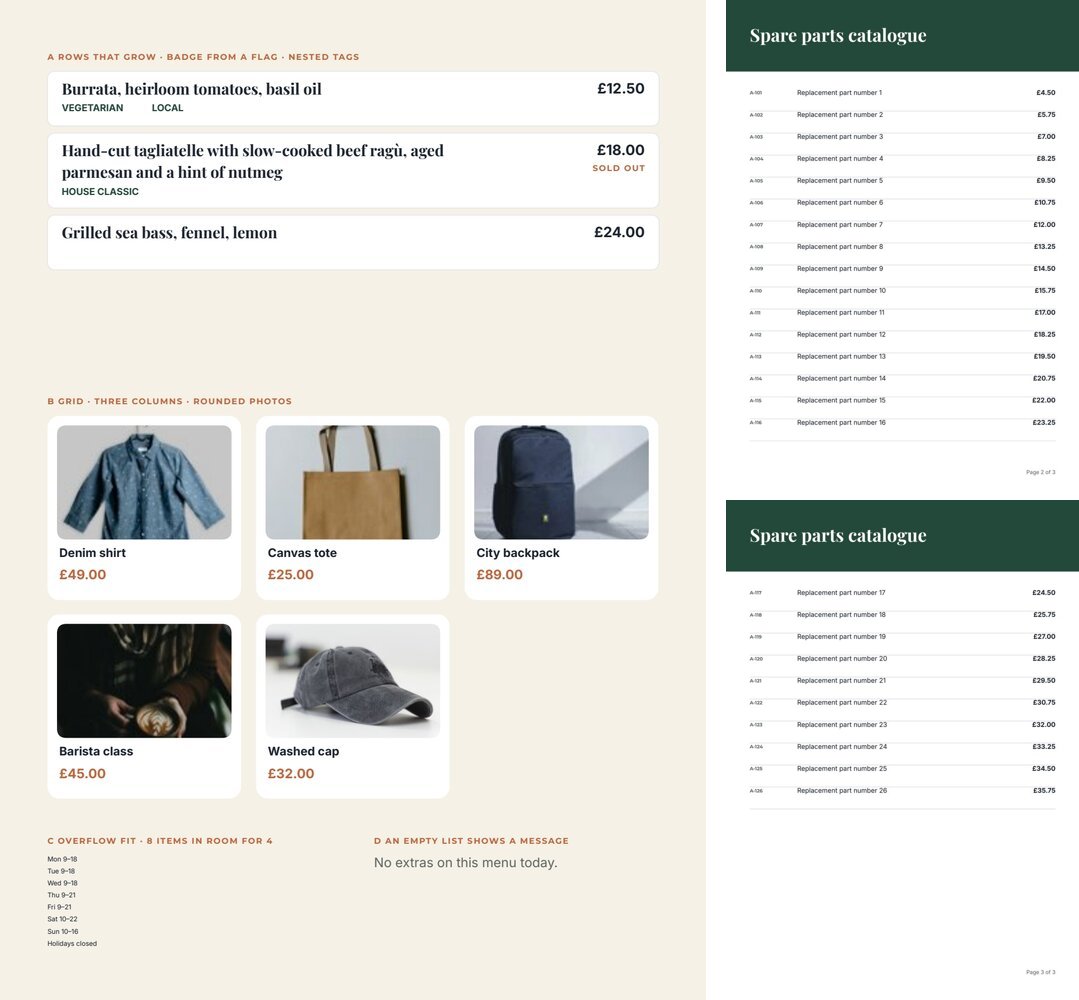
The list and its row
Section titled “The list and its row”A list reads a field of type json — an array of objects, one per row:
"dishes": [ { "name": "Burrata, heirloom tomatoes, basil oil", "price": 12.5, "sold_out": false, "tags": [ { "label": "VEGETARIAN" }, { "label": "LOCAL" } ] }, { "name": "Grilled sea bass, fennel, lemon", "price": 24, "sold_out": false, "tags": [] }]The repeat_region carries that field and names it in sourceCode. Its children are the row: elements
positioned relative to the row’s top-left corner. An element of the row reads a key of the current item through a
field with a bindingPath item.<key>:
{ "$type": "repeat_region", "id": "5c0de888-0000-4000-8000-000000000101", "name": "Menu", "left": 40, "top": 60, "width": 515, "height": 250, "sourceCode": "dishes", "maxItems": 6, "overflowPolicy": "fail", "placeholder": { "id": "5c0de888-0000-4000-8000-000000000102", "name": "Dishes", "code": "dishes", "placeholderType": "json", "required": true, "description": "Today's dishes: name, price, sold_out, tags." }, "layout": { "mode": "vertical", "rowGap": 6 }, "children": [ { "$type": "text", "id": "5c0de888-0000-4000-8000-000000000103", "name": "Dish", "left": 12, "top": 8, "width": 330, "height": 16, "text": "Dish", "fontFamily": "Playfair Display", "fontSize": 13, "fontWeight": "bold", "fill": "#1c2430", "placeholder": { "id": "5c0de888-0000-4000-8000-000000000104", "name": "Dish", "code": "dish_name", "placeholderType": "text", "required": true, "bindingPath": "item.name" } }, { "$type": "text", "id": "5c0de888-0000-4000-8000-000000000105", "name": "Price", "left": 400, "top": 8, "width": 103, "height": 16, "text": "0", "textAlign": "right", "fontFamily": "Inter", "fontSize": 12, "fontWeight": "bold", "fill": "#1c2430", "placeholder": { "id": "5c0de888-0000-4000-8000-000000000106", "name": "Price", "code": "dish_price", "placeholderType": "number", "required": true, "bindingPath": "item.price", "format": { "locale": "en-GB", "numberStyle": "currency", "currency": "GBP", "currencyDisplay": "symbol", "minimumFractionDigits": 2 } } } ] }- The row’s size is the box around its children (here 515 wide, 32 tall with the badge below the price). Rows
follow one another
rowGapapart. - The key is what matters, not the field’s
code:item.namereadsnameof each item. The codes of fields inside a row only have to be unique. Nested keys work:item.author.name. - The keys the row reads are the list’s item contract: a workflow or an agent reads them in the template’s
contract to know what each item must contain. A required key missing in an item stops the render with
DESIGN_PLACEHOLDER_REQUIREDand a path such asdishes[1].price. - The row can hold anything a page holds: texts, images, shapes, Layouts, even another list.
Arranging the rows
Section titled “Arranging the rows”layout.mode arranges the rows: vertical (one below the other), horizontal (side by side) or grid with
columns. In a grid each cell is width ÷ columns wide (minus gaps), and the row is designed for one cell — the
product cards of lab example B:
"layout": { "mode": "grid", "columns": 3, "rowGap": 12, "columnGap": 12 }rowGap, columnGap and the padding settings work as in a Layout.
Rows that grow
Section titled “Rows that grow”A text in a row can grow with its value — grow with maxLines and beyond, as on
Text — and the row grows with it; the rows below move down.
"height": "at_least_drawn"(the default in a row) never makes the text shorter than drawn, so short rows keep the drawn height;"content"makes it exactly as tall as its lines.- A row is never shorter than it is drawn. Draw the row at its smallest size — a one-line name, a one-line description — and let it grow; a row drawn 40 points tall takes 40 points even for a dish with one short line.
- A Layout whose children are all hidden still takes its drawn height. A row of optional tags where no tag
applies leaves an empty line: give the Layout itself a condition —
anyof the tag flags — so that it disappears with them. - A background that follows the row: a rectangle, ellipse, image or line with
"followsRowHeight": truestretches with the row — the white card of each dish. A rectangle or line as tall as the row stretches by default;falsekeeps a shape at its size. - Elements below a growing text do not move by themselves — the row is not a Layout. To keep the tags under a dish name of any length, put the name and the tags in a flowing Layout inside the row, as the lab does:
{ "$type": "layout_region", "id": "5c0de888-0000-4000-8000-000000000107", "name": "Dish block", "left": 12, "top": 8, "width": 330, "height": 32, "layout": { "mode": "vertical", "sizing": "hug", "childSizing": "content", "rowGap": 4 }, "children": [ { "$type": "text", "id": "5c0de888-0000-4000-8000-000000000111", "name": "Dish", "left": 0, "top": 0, "width": 330, "height": 16, "text": "Dish", "fontFamily": "Playfair Display", "fontSize": 13, "fontWeight": "bold", "fill": "#1c2430", "placeholder": { "id": "5c0de888-0000-4000-8000-000000000112", "name": "Dish", "code": "dish_title", "placeholderType": "text", "required": true, "bindingPath": "item.name" }, "grow": { "maxLines": 3, "beyond": "ellipsis", "height": "content" } } ] }The tags list (next section) is the Layout’s second child, so it always starts 4 points below the last line of the name.
Flags and other keys the row does not print
Section titled “Flags and other keys the row does not print”A condition in a row can read any key of the item: { "operator": "equals", "placeholderCode": "item.sold_out", "literal": "true" } prints the SOLD OUT label only on the dishes that are finished. A key that no element prints
should be declared on the list, so it is part of the item contract that workflows and agents read:
"itemFields": [ { "code": "sold_out", "name": "Sold out", "type": "boolean", "description": "True when the dish is finished for today." } ]Types are text, number and boolean, up to 50 keys. A link in a row can read item keys too
("href": "https://shop.example.com/p/{item.sku}").
A list inside each item
Section titled “A list inside each item”An item can hold its own list — the tags of a dish, the features of a product, the modules of a course. A list
inside the row reads it with "sourceCode": "item.<key>" and no field of its own:
{ "$type": "repeat_region", "id": "5c0de888-0000-4000-8000-000000000108", "name": "Tags", "left": 0, "top": 20, "width": 330, "height": 12, "sourceCode": "item.tags", "maxItems": 6, "overflowPolicy": "clip", "layout": { "mode": "horizontal", "columnGap": 6 }, "children": [ { "$type": "text", "id": "5c0de888-0000-4000-8000-000000000109", "name": "Tag", "left": 0, "top": 0, "width": 70, "height": 12, "text": "tag", "fontFamily": "Inter", "fontSize": 8, "fontWeight": "bold", "fill": "#23493a", "placeholder": { "id": "5c0de888-0000-4000-8000-000000000110", "name": "Tag", "code": "tag_label", "placeholderType": "text", "required": false, "bindingPath": "item.label" } } ] }Inside the inner list, item. refers to the inner item (item.label of each tag). Lists nest two levels deep. The
inner list’s drawn height is the most it may take: draw it tall enough for its longest list (it takes only the height
of its rows), or its overflow rule applies. The restaurant menu nests the dishes
inside the sections of the menu. Do
not give the inner list a json field with a bindingPath: that form is rejected (DESIGN_BINDING_INVALID: A JSON repeat source must be a root placeholder).
Empty lists and absent lists
Section titled “Empty lists and absent lists”- An empty list prints no rows. To say so, add a text next to the list with the condition “the list is not
non-empty”:
{ "operator": "not", "conditions": [ { "operator": "not_empty", "placeholderCode": "extras" } ] }— lab example D. - A list that may be missing altogether must have
"required": falseon its field. - In a flowing Layout an empty list takes only its padding, so what follows moves up.
When the rows do not fit
Section titled “When the rows do not fit”A list has a box. How many rows fit depends on the box and the row size; overflowPolicy decides what happens to
the others:
overflowPolicy |
What happens | Use it when |
|---|---|---|
fail (default) |
The render stops with DESIGN_REPEAT_OVERFLOW, naming the list |
Missing rows would be wrong: a quote, an invoice, a programme |
fit |
All rows print, shrunk together until they fit — text gets smaller | A few extra rows are acceptable at a smaller size: opening hours, a short list of features (lab example C) |
clip |
Only the rows that fit print; the report says how many were left out | Losing rows is acceptable: “top picks”, a preview of a longer list |
continue_page |
Extra rows go to copies of the page | Catalogues, price lists, participant lists |
maxItems (1–100) is a separate, hard ceiling: a list with more items stops the render with
DESIGN_REPEAT_LIMIT_EXCEEDED, whatever the policy. Set it to the most the document may ever hold.
A workflow can override the policy of every list of a template from the Render Document Template node (its overflow setting); by default the template’s own rule applies.
Catalogues that continue on new pages
Section titled “Catalogues that continue on new pages”With continue_page, the rows that do not fit on the page go to copies of the page — the whole page, with its
header, background and page number. The lab’s 26 spare parts become two pages; Page {{page}} of {{pages}} counts
them correctly.
- Only one list per page can continue, and it must sit directly on the page — not inside a Layout or another
list (
DESIGN_REPEAT_CONTINUATION_INVALID). - Design the page so that its header and footer make sense on every copy.
- A document can reach 200 pages in one render.
In the editor
Draw one row — texts, images, shapes — and make the elements that change placeholders (Make Placeholder): the
code you give each one becomes the key it reads from every item (name, price). Then select the row’s
elements, open the Fields panel and, under Arrange selected elements, choose Repeat. Selecting the list
shows its settings in the same panel:
- Data: the List key in the workflow data, a workflow data example, and Add a key the row does not print to declare flags such as sold out;
- Rows are placed: One below the other, Side by side, In a grid (with Columns), with Space between rows, Space between columns and Inner padding;
- Max items and When the rows do not fit: Stop with an error, Shrink the rows to fit, Print only the rows that fit, Continue on new pages;
- Long texts: tick a text of the row to make it grow, then Up to lines and Beyond that; below, the shapes that stretch with the row.
The items of the sample sets are edited as JSON in the Fields panel (Items as JSON).
Recipes
Section titled “Recipes”| You need | Do |
|---|---|
| A menu, a programme, a price list | Vertical list; name and price in each row; fail so nothing is ever lost |
| Product cards | Grid with 2–4 columns; photo field with a rounded frame, name, price |
| Line items followed by a total | The list and the total inside one flowing Layout: the total follows the last row |
| A badge on some rows only | A key in each item (sold_out, new), declared in itemFields, read by a condition |
| Features or tags of each product | A list inside the row with sourceCode: "item.features" |
| Rows with names of any length | grow on the name, followsRowHeight on the row background, the elements below it in a Layout |
| A catalogue of any length | continue_page on a list placed directly on the page, page numbers in the footer |
| One page per item — carousel slides, flash cards | A list with continue_page whose row is taller than half its box: one row fits per page, and every item gets its own page (F14) |
| A message when there is nothing to show | A text with the condition not not_empty on the list |
Checklist
Section titled “Checklist”- The list’s field has a
descriptionnaming the keys of each item. - Every key read only by a condition or a link is declared in
itemFields. -
maxItemsis the real maximum;overflowPolicyis chosen on purpose. - Rows with variable text grow, and the row background follows them.
- Sample sets include the longest list, a single item and — if it can happen — an empty list.