

F05 — Wine price list from a spreadsheet
A winery exports its restaurant price list from its management system as an Excel sheet; Madoo turns it into a multi-page PDF catalogue: one card per wine, with a description written by the AI from the winemaker’s notes, while prices, vintages, alcohol, bottle sizes and stock reach the page exactly as they are in the sheet. The cards fill a grid that continues on new pages by itself.
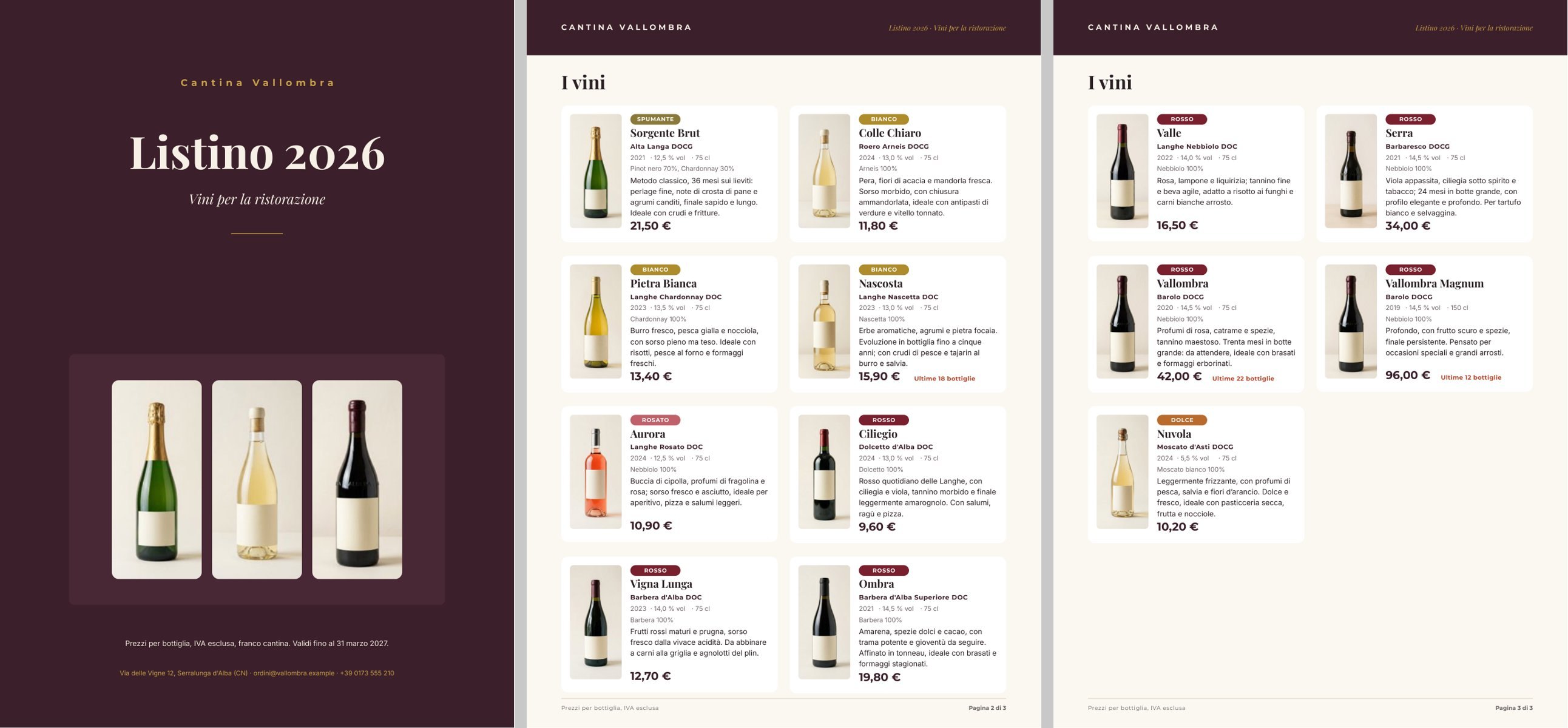
A reference run: 26 seconds, 0.22 credits for thirteen descriptions, three pages. PDF · rows with their descriptions · layout report · pages 1, 2, 3.
The case
Section titled “The case”Cantina Vallombra (fictional, in the Langhe; the denominations are real) sends restaurants and wine shops its price list every year. The list lives in the management system; whoever lays it out copies it by hand every year.
| Input | Who provides it | Example |
|---|---|---|
| Price list | the management system, as Excel: code, wine, denomination, type, vintage, grapes, alcohol, size, restaurant price, bottles available, winemaker’s notes, pairings, photo | listino-vallombra.xlsx, thirteen wines |
| Winery and catalogue | the winery’s records: name, title and subtitle of the list, price validity, contacts | one JSON object |
The bottle photos are the ones the winery already has: a consistent set (same background, same light), generated once as the example’s starting data. The sheet refers to them by path, as it would to the image addresses of its website.
What it shows
Section titled “What it shows”- The sheet is the truth. Price, vintage, alcohol, size and stock go from
input/datato the template without touching a model: typed as numbers when the sheet is read (enumerate/data_rowsin strict mode — a non-numeric cell stops the workflow and names the row and the column), formatted only by the template. - The AI writes one thing: the description. One call per row, with the facts of the wine composed by
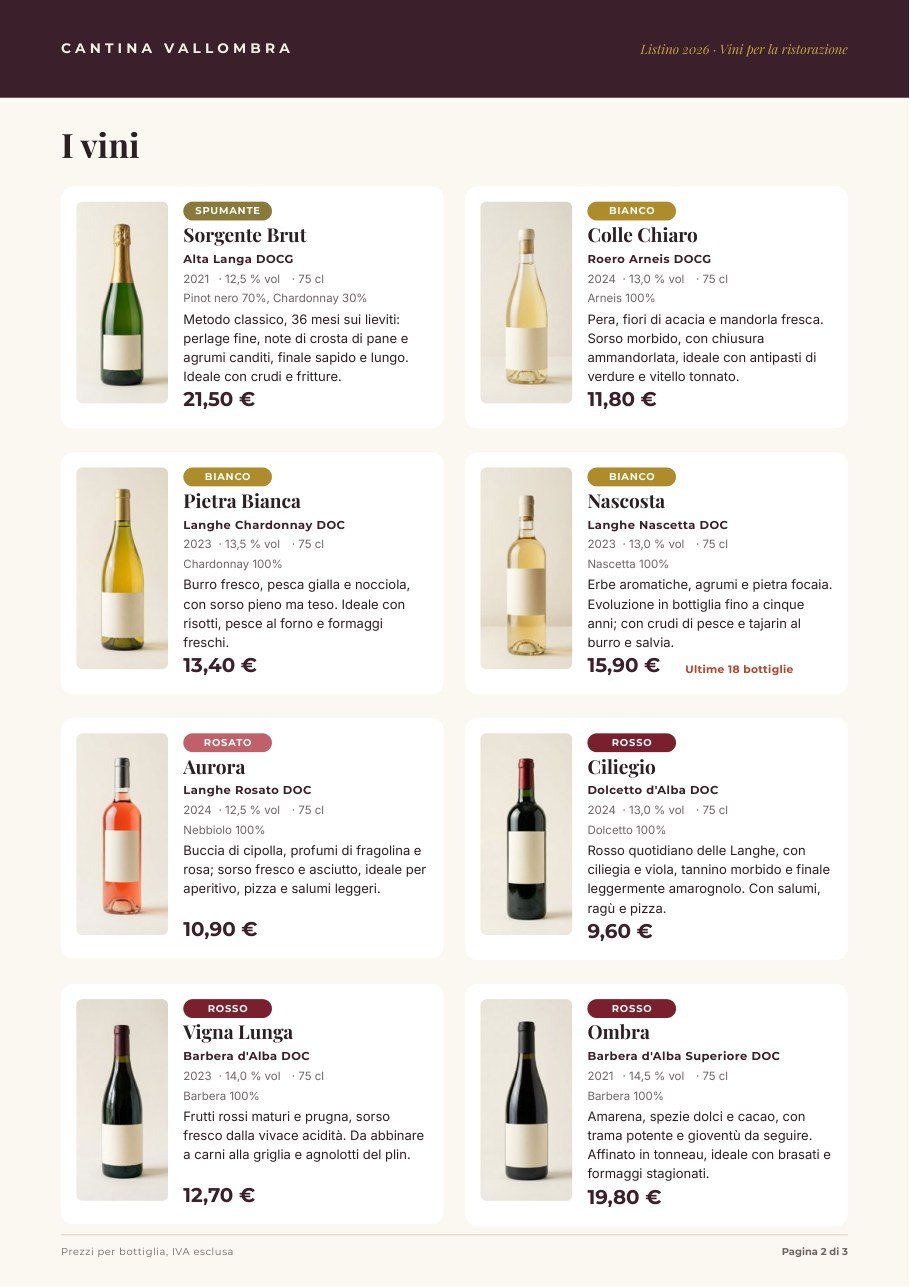
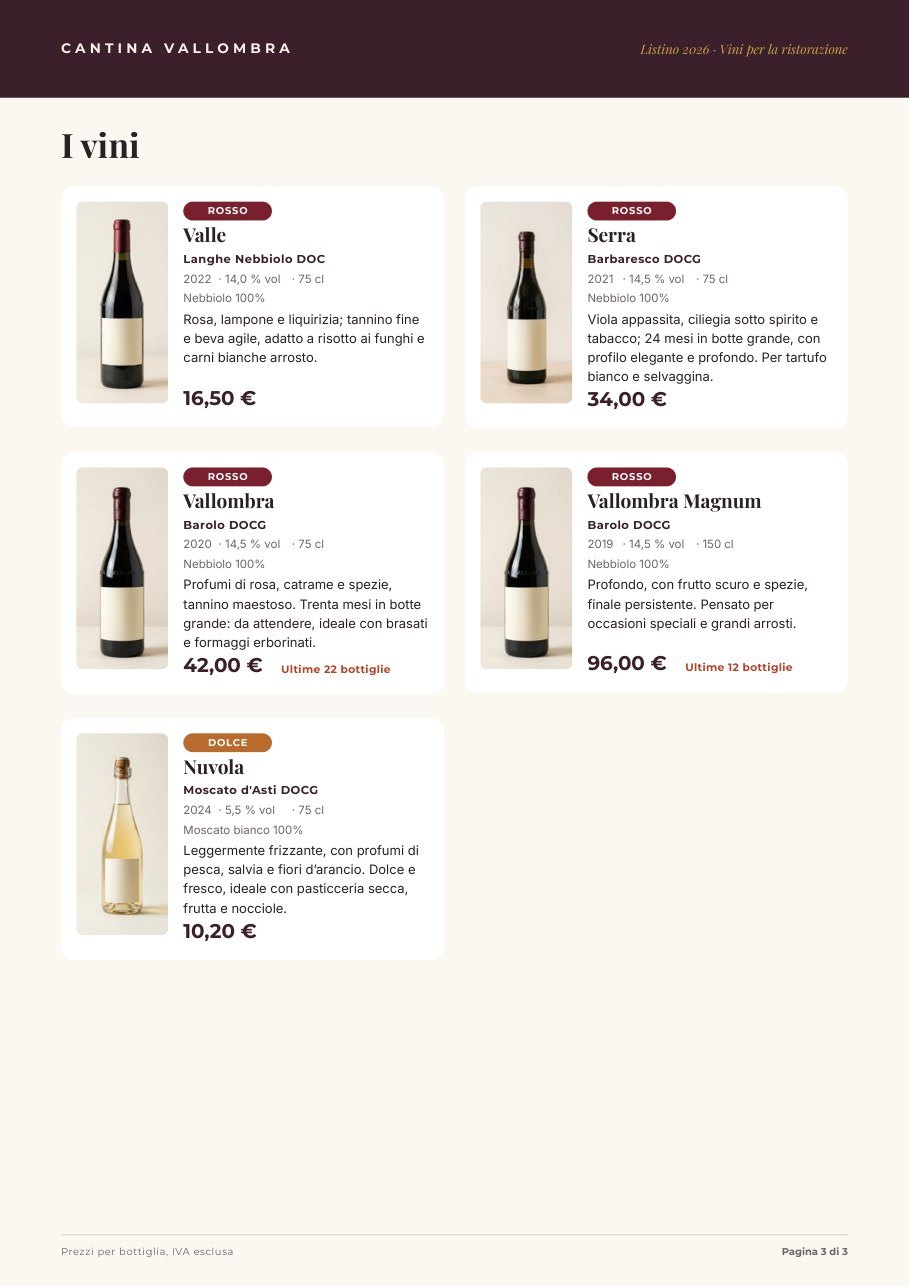
text/template. The instructions forbid repeating name, denomination, vintage, grapes, alcohol and price (the catalogue prints them) and inventing awards, scores or numbers. A JSON Schema checks each description (40–170 characters) before layout. See Iteration. - The catalogue grows with the list. The wine list sits directly on the page with the rule continue on new pages: eight cards per page, and one more copy of the page for every eight more wines. Thirteen wines make three pages (cover included); thirty would make five, without touching the template. See Catalogues that continue on new pages.
The template
Section titled “The template”A4; Playfair Display for names and titles, Montserrat for labels and prices, Inter for text; wine #3b1f2b, cream
#f7f1e6, gold #c9a24a.
| Page | Content | How it is built |
|---|---|---|
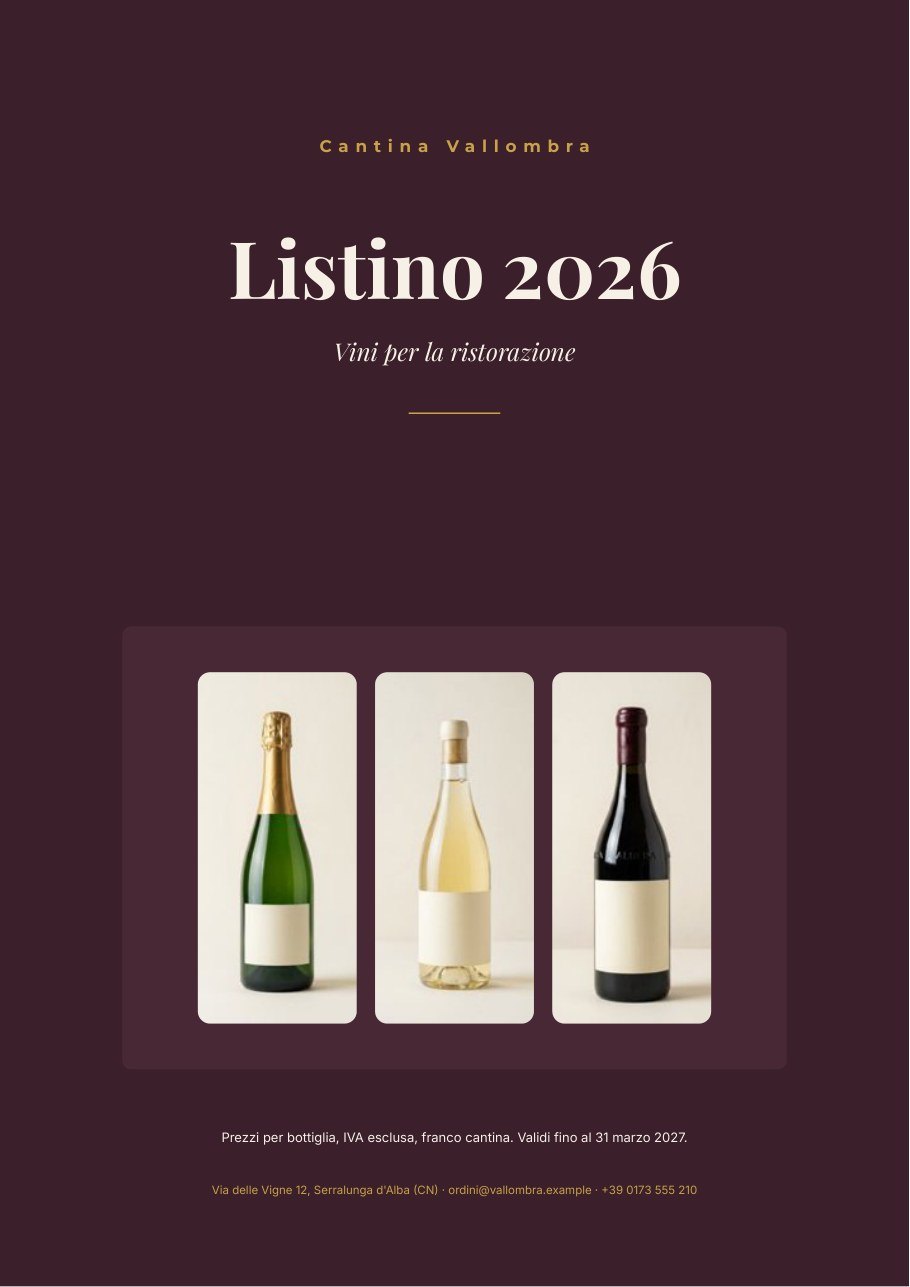
| Cover | winery name, Listino 2026, subtitle, three bottles, validity, contacts | fields of the Winery and catalog object; the three photos are part of the design, each in a rounded box |
| Catalogue | I vini and the cards | the repeated list wines as a grid (2 columns, 4 rows per page), overflowPolicy: continue_page, up to 40 wines; master page Catalog pages |
| Master | a band with the name, Listino 2026 · Vini per la ristorazione, a footer with Pagina {{page}} di {{pages}} | static elements; the page number is a special field (Master pages) |
The card is a horizontal Layout: the bottle photo (item.photo, fill) and, beside it, a vertical Layout with
the type badge, the name, the denomination, the data line, the grapes, the description and the price.
| Data | Field | How it prints |
|---|---|---|
| Type | item.type |
five coloured badges, each with the condition equals (Spumante, Bianco, Rosato, Rosso, Dolce) |
| Vintage | item.vintage, number |
no thousands separator: 2021, never 2.021 |
| Alcohol | item.alcohol, number |
one decimal and affixes: · 14,5 % vol |
| Size | item.size, number |
· 75 cl, · 150 cl |
| Price | item.price, number |
it-IT currency with two decimals: 21,50 €, 96,00 € |
| Stock | item.stock, number |
only when ≤ 30, with affixes: Ultime 18 bottiglie |
| Name, denomination, grapes, description | item.name, item.denomination, item.grapes, item.description |
text; the description comes from the AI |
The cover fields winery, catalog_title, catalog_subtitle, validity and contact come from the Winery and
catalog object on data_0; the list wines comes from its own port. Number formats and conditions are explained in
Conditions, links and formats.
Design choices worth copying:
- All cards the same. Every text of the card is drawn for its maximum lines with the rule at least as drawn (name 1 line, description 4): the cards have the same height, the grid stays regular and each page holds exactly eight.
- Numbers that speak the reader’s language. Everything that is a number in the sheet stays a number up to the page, where the field format decides how it is written; affixes (Ultime … bottiglie, % vol, cl) avoid hand-composed texts.
- The sheet is not touched. No column computed or reformatted for Madoo: the sheet is the management system’s, with its own formats (price in euros, alcohol with one decimal).
- Three sample sets — Listino completo (13 vini), Otto vini, una pagina, Tre vini — show in the editor how many pages the list produces.
The workflow
Section titled “The workflow”Price list (Excel) ──► One wine at a time (one iteration per row) name, denomination, type, grapes, notes, pairing ──► Facts of the wine ──► Write the description (AI, JSON) ──► Description fits the card (JSON Schema) ──► Description ──description──► Wines with their descriptions code, name, …, price, stock, photo ──────────────────────────────────────────► Wines with their descriptionsWinery and catalog ──data_0──► Compose the catalog ◄──wines── Wines with their descriptionsCompose the catalog (Render Document Template) ──► PDF · Page images · Rows · Layout report| Node | Type | Why |
|---|---|---|
| Price list (Excel) | input/data, locale: it-IT, header on the first row, cached formula values |
Normalises the Excel into a portable dataset; the same workflow accepts CSV or JSON. The winery’s file is the default value, replaceable at every run |
| Winery and catalog | input/json_value |
The winery’s records as one object |
| One wine at a time | enumerate/data_rows |
Thirteen columns mapped to typed ports, text or number, strict conversion; one row at a time |
| Facts of the wine | text/template |
Composes the facts of the wine for the model |
| Write the description | ai/text_generation, json_object, temperature 0.4 |
One description per wine from the winemaker’s notes |
| Description fits the card | utility/json_schema_validate, mode fail |
40–170 characters; an out-of-size description stops the workflow |
| Description | utility/extract |
Takes the description out of the JSON as text |
| Wines with their descriptions | aggregate/json |
Joins each row to its description; numbers stay numbers (columns of type number) |
| Compose the catalog | design/template_render, output both, max_repeat: 40, missing_policy: fail_required |
The winery on data_0, the recomposed list on wines |
| Outputs | output/pdf, output/json ×3 |
The catalogue PDF, the page images, the rows with their descriptions, the layout report |
Reading a run: Wines with descriptions is the list as it reached the template, one row per wine with its
description; the Layout report shows outputPageCount: 3, repeatItems: 13, no warnings. A non-numeric cell in a
number column stops the run on One wine at a time, naming the row and the column.
Cost: 0.22 credits per run — thirteen descriptions; reading the sheet, validation and composition are free. The bottle photos are starting data, generated once (12 images, 60 credits), not at every catalogue.
Install it
Section titled “Install it”The example installs into your workspace with an API key, through the public API only — see Installing an example:
node madoo-install-example.mjs f05 --api <your Madoo API URL> --key <key.json>It uploads the twelve bottle photos, then the price list with their paths, publishes the template and the workflow, and
sets the uploaded list as the default value of Price list. The installer uploads the list as JSON
(listino-vallombra.json, the same rows and columns as
the Excel sheet), because input/data reads CSV, JSON or XLSX alike. To run it, open the workflow and paste the winery
object from run-inputs.json into Winery and catalog, or add
--run (about 0.2 credits).
Change it
Section titled “Change it”- Another list: upload another file with the same columns and choose it as Price list at run time.
- More wines: up to 40 without touching anything; pages are added by themselves.
- Another sector: the structure — sheet → one AI description per row → catalogue on continuing pages — works for spare parts, cosmetics, equipment; columns, card and instructions change.
- Another price format: currency, decimals and language of the Price field are changed in the template.
manifest · template · workflow · run inputs · price list (Excel) · price list (JSON)