

F06 — Proposal with the customer's photo
A customer sends a plant nursery the photo of her empty terrace and a few lines about what she wants; the nursery picks and prices the plants in its management system; Madoo composes a two-page proposal where the customer sees her own terrace before and after (an AI simulation, declared as such), reads why those plants answer what she asked, and finds plants, quantities, prices and total exactly as the nursery gave them, with a link to confirm.
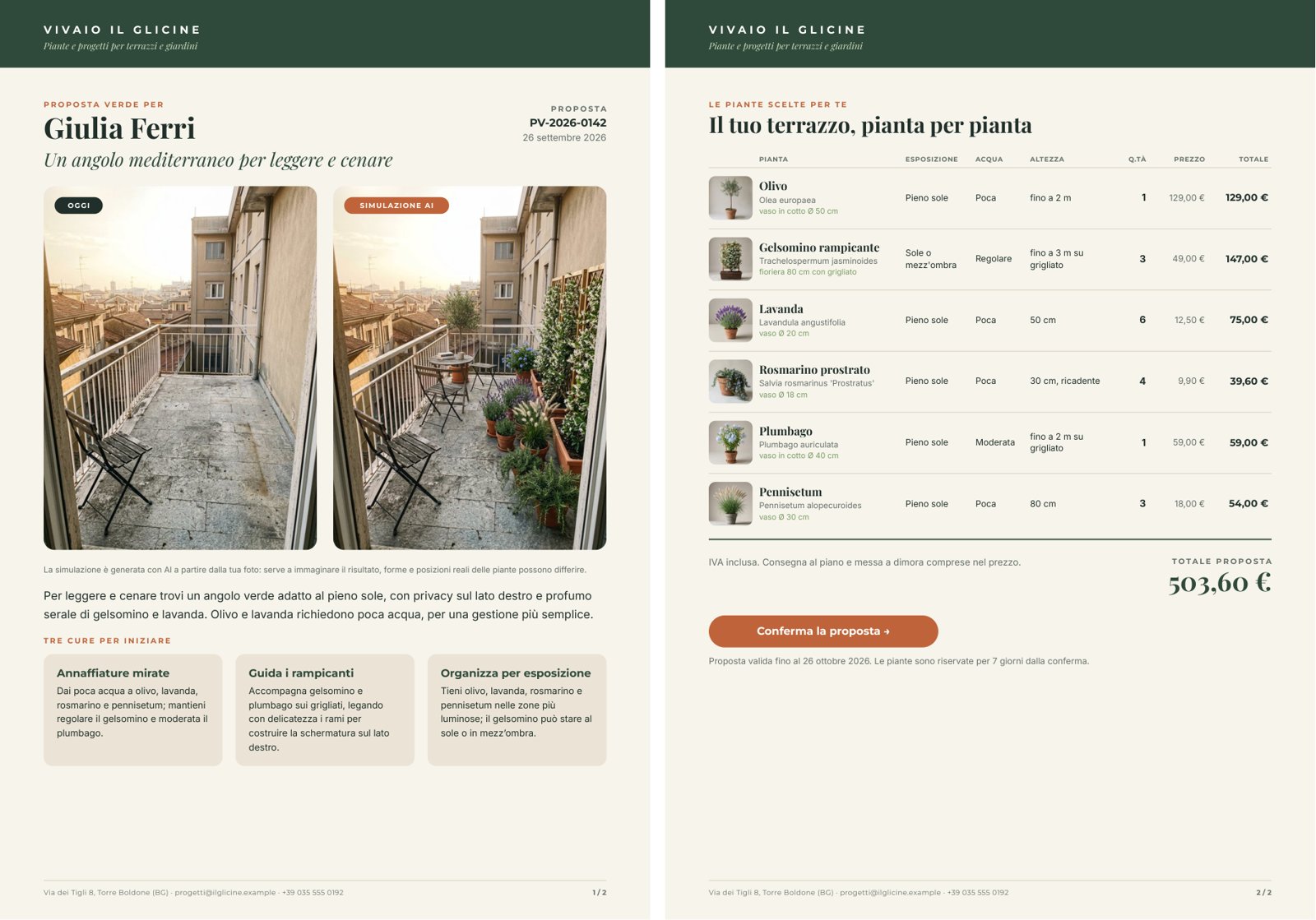
A reference run: 51 seconds, 5.13 credits. PDF · the simulation · the AI copy · layout report · pages 1, 2.
The case
Section titled “The case”Vivaio Il Glicine (fictional, near Bergamo) designs the greenery of terraces and gardens. Today whoever answers a request prepares a quote by hand, and whoever receives it has to imagine the result.
| Input | Who provides it | Example |
|---|---|---|
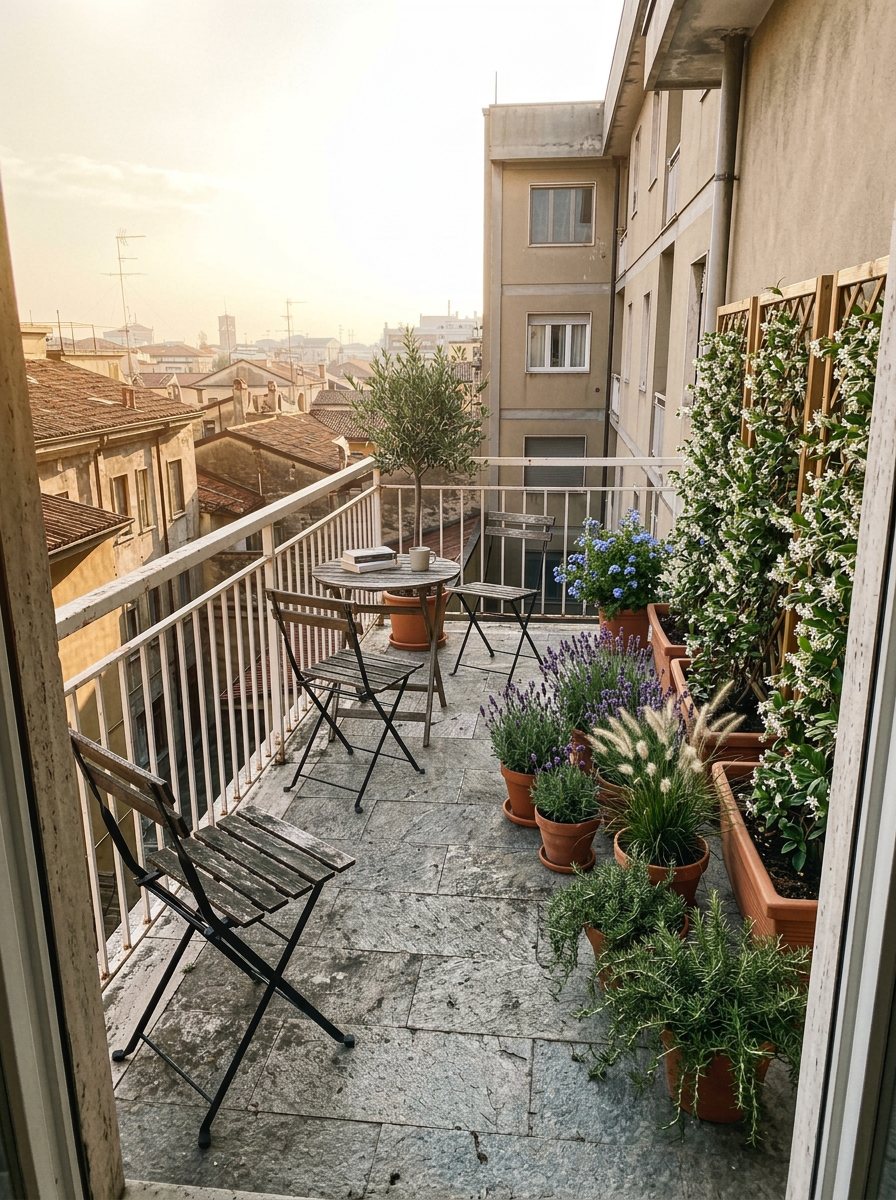
| Photo of the terrace | the customer, with her phone | an empty terrace, deliberately shot like a phone snapshot (tilted framing, a folding chair, stains on the floor) |
| Customer notes | the customer, from the contact form | 12 m², south-west, privacy from the building opposite, scent, little time, no thorns |
| Selected plants and prices | the nursery’s management system | for each plant name, Latin name, exposure, water, height, pot, quantity, unit price, line total, catalogue photo; then total, validity, confirmation link — one JSON object |
The terrace photo and the six catalogue photos are the example’s starting data, generated once.
What it shows
Section titled “What it shows”- The proposal is about the customer’s terrace, not a terrace. The staging does not generate a scene from scratch:
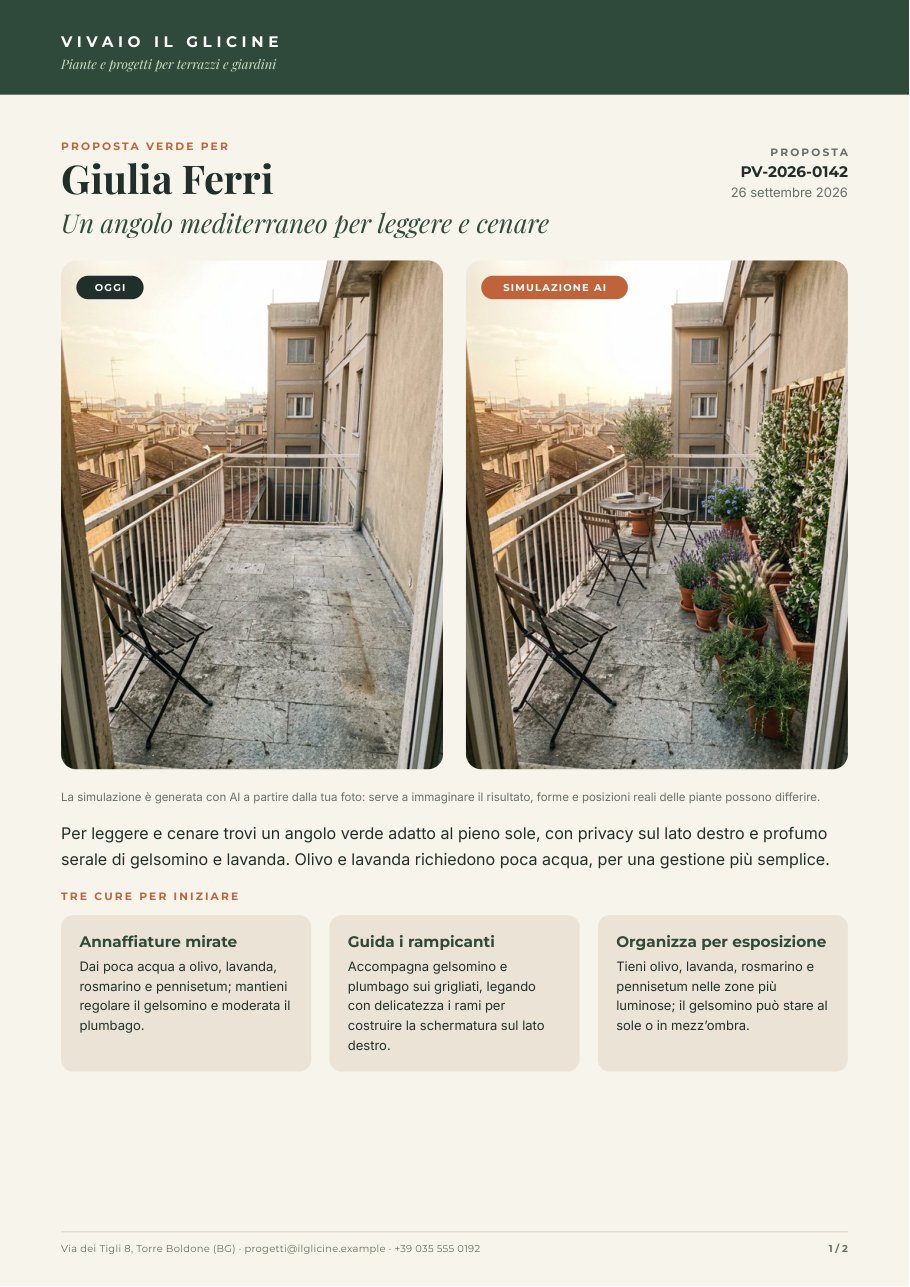
ai/image_transformreceives the customer’s photo and an instruction to keep everything as it is (floor, railing, walls, the building opposite, light, framing) and add only the chosen plants, in their quantities. On the page the image carries the badge SIMULAZIONE AI, and a note below says real shapes and positions may differ. - What is paid for does not pass through the AI. Plants, quantities, prices and total come from the management
system on
data_1and win over any value with the same key in the AI copy ondata_0. The instructions forbid the model prices, discounts, guarantees, plants not chosen, and claims about the plants’ safety for pets or children — advice the nursery gives in person. See Templates in workflows. - One model, three tasks, one contract. A single call writes the headline, the introduction, three tips and the staging instruction; a JSON Schema checks it (lengths with a 10% margin over the instructions, exactly three tips) before the image starts — the image costs forty times more.
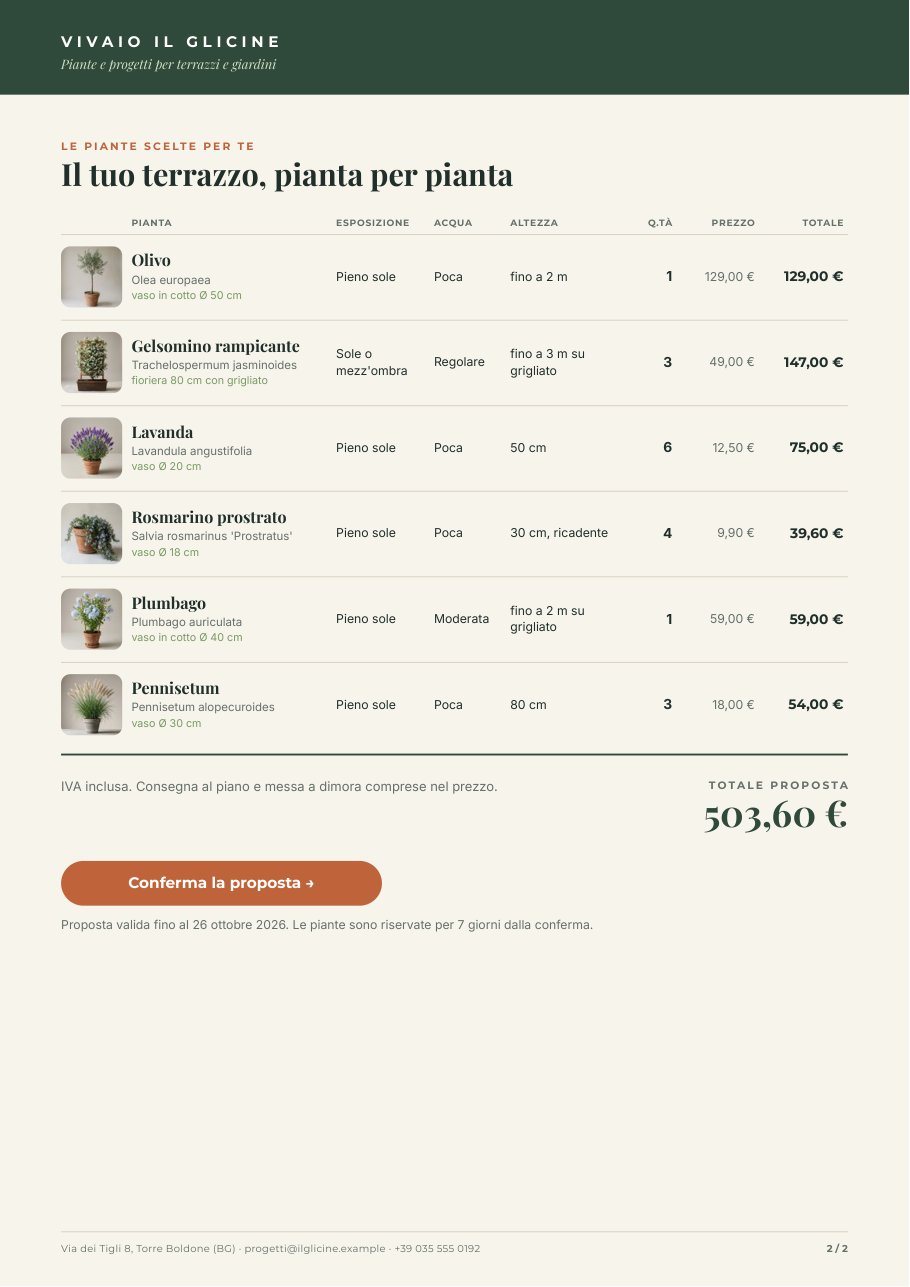
- The table follows its rows. The plant list sits in a flowing Layout: with six plants, total, button and validity move up under the sixth row; with three, under the third. See Flowing layouts.
The template
Section titled “The template”A4, two pages under the master page Letterhead (a band with the nursery’s name, a footer with contacts and N / M);
Playfair Display for names and titles, Montserrat for labels and amounts, Inter for text; green #2f4a3a, paper
#f7f4ec, terracotta #c0643a.
| Page | Content | How it is built |
|---|---|---|
| Proposal | Proposta verde per + name, AI headline, code and date; the photos OGGI and SIMULAZIONE AI side by side; the note on the simulation; introduction; three tips | a flowing Layout: header in two columns, the photo row (two fixed 250 × 333 boxes, the 3:4 of a phone, with the badge inside), texts, the list care_tips as a grid of three |
| Plants | Il tuo terrazzo, pianta per pianta; table; total; button Conferma la proposta →; validity | a flowing Layout: column header, the list plants (vertical, up to 8), closing rule, total, confirmation |
| Data | Field | How it prints |
|---|---|---|
| Customer’s photo | terrace_photo, image |
fill, rounded corners (Images) |
| Simulation | staging_image, image |
as above, with the terracotta badge |
| Plant | item.photo, item.name, item.latin_name, item.pot |
catalogue photo, name, Latin name in italics, pot in green |
| Exposure, water, height | item.exposure, item.water, item.height |
text, up to two lines |
| Quantity | item.quantity, number |
integer, right-aligned |
| Unit price and line total | item.unit_price, item.line_total, numbers |
it-IT currency: 12,50 €, 147,00 € |
| Total | total, number |
currency, large: 503,60 € |
| Link | confirm_url (optional) |
the button’s link; without a link there is no button (Links) |
The AI fills headline, intro and care_tips ({ title, text }); the nursery fills customer_name,
proposal_code, proposal_date, plants, total, total_note, validity and confirm_url.
Design choices worth copying:
- Before and after at the same size. Two identical boxes, the same crop: the eye compares the same point of view.
The simulation keeps the photo’s proportions (
aspect_ratio: match_input). - A table, not cards. Whoever receives a proposal compares rows and checks the bill: columns with a header, amounts right-aligned, the line total in bold. Column widths are fixed (a text does not widen with its content), sized on the nursery’s data.
- Tips of the same height. Each tip is drawn for five lines with the rule at least as drawn: the three boxes stay aligned whatever the length of the text.
- Three sample sets — Terrazzo Ferri (6 piante), Tre piante, senza link, Otto piante (il massimo) — show how page 2 follows the table and what happens without a link.
The workflow
Section titled “The workflow”Selected plants and prices ──► Selected plants ──► Compose the brief ◄── Customer notesCompose the brief ──► Write the proposal and the staging (AI, JSON) ──► Copy fits the proposal (JSON Schema)Copy fits the proposal ──► Staging instruction ──prompt──► Stage the plants on the terrace ◄──images_0── Photo of the terraceCopy fits the proposal ──data_0──────────► Compose the proposal (Render Document Template)Selected plants and prices ──data_1──────► Compose the proposalPhoto of the terrace ──terrace_photo─────► Compose the proposalStage the plants on the terrace ──staging_image──► Compose the proposal ──► PDF · Page images · Layout report| Node | Type | Why |
|---|---|---|
| Photo of the terrace (from the customer) | input/image |
The customer’s photo; in the example the default value, at every request the new photo |
| Customer notes | input/text |
The customer’s words, as she wrote them |
| Selected plants and prices (from the nursery) | input/json_value |
The nursery’s choice with its prices, printed as it is |
| Selected plants | utility/extract (plants) |
Passes only the list of plants to the model |
| Compose the brief | text/template |
Notes and plants in one message; a JSON input enters the text as it is |
| Write the proposal and the staging | ai/text_generation, json_object, temperature 0.5 |
Headline, introduction, three tips, the image instruction |
| Copy fits the proposal | utility/json_schema_validate, mode fail |
Stops out-of-size copy before the image is paid for |
| Staging instruction | utility/extract |
The instruction, in English, for the image model |
| Stage the plants on the terrace | ai/image_transform, default model, match_input |
The plants on the customer’s photo |
| Compose the proposal | design/template_render, output both, max_repeat: 8, missing_policy: fail_required |
AI copy on data_0, the nursery’s facts on data_1 (they win), the two photos by name |
| Outputs | output/pdf, output/image, output/json ×3 |
The proposal PDF, the simulation, the page images, the approved copy, the layout report |
Reading a run: Approved copy is what the AI wrote before layout; the Layout report shows repeatItems: 9,
imagesLoaded: 10, no warnings. The simulation changes from one run to the next (one attempt put the olive tree in the
foreground, another at the back): it is a visual proposal, not a project — which is why the badge and the note stay.
Cost: 5.13 credits per run — the copy and instruction 0.13, the terrace simulation 5; composition is free. Without the simulation the proposal would cost 0.13 credits. The photos (terrace and catalogue) are starting data: 7 images, 35 credits, once.
Install it
Section titled “Install it”The example installs into your workspace with an API key, through the public API only — see Installing an example:
node madoo-install-example.mjs f06 --api <your Madoo API URL> --key <key.json>It uploads the terrace photo (the default value of Photo of the terrace) and the six catalogue photos, publishes the
template and the workflow. To run it, open the workflow and paste the nursery’s choice from
run-inputs.json — with the paths of the uploaded catalogue
photos in place of its placeholders — into Selected plants and prices, or add --run, which fills them for you
(about 5 credits).
Change it
Section titled “Change it”- Another customer: another photo in Photo of the terrace, other notes, another choice from the nursery.
- Another sector: the structure — customer’s photo → product staged on it → offer with the management system’s prices — works for furniture, awnings, flooring, lighting, kitchens; table and instructions change.
- Without simulation: remove the image node and the after box; the proposal costs 0.13 credits.
- Different tips: ask explicitly that the items of a multi-part text differ from each other; a first draft of this example had two watering tips out of three until the instructions required three different topics.
manifest · template · workflow · run inputs