

F08 — Course poster in a brand font
The head office of a network of language schools designs the course poster once, in the brand font, and shares it with the schools of the network; each school imports it into its own workspace, font included, and produces its own posters, which come out in the same style as the head office’s.
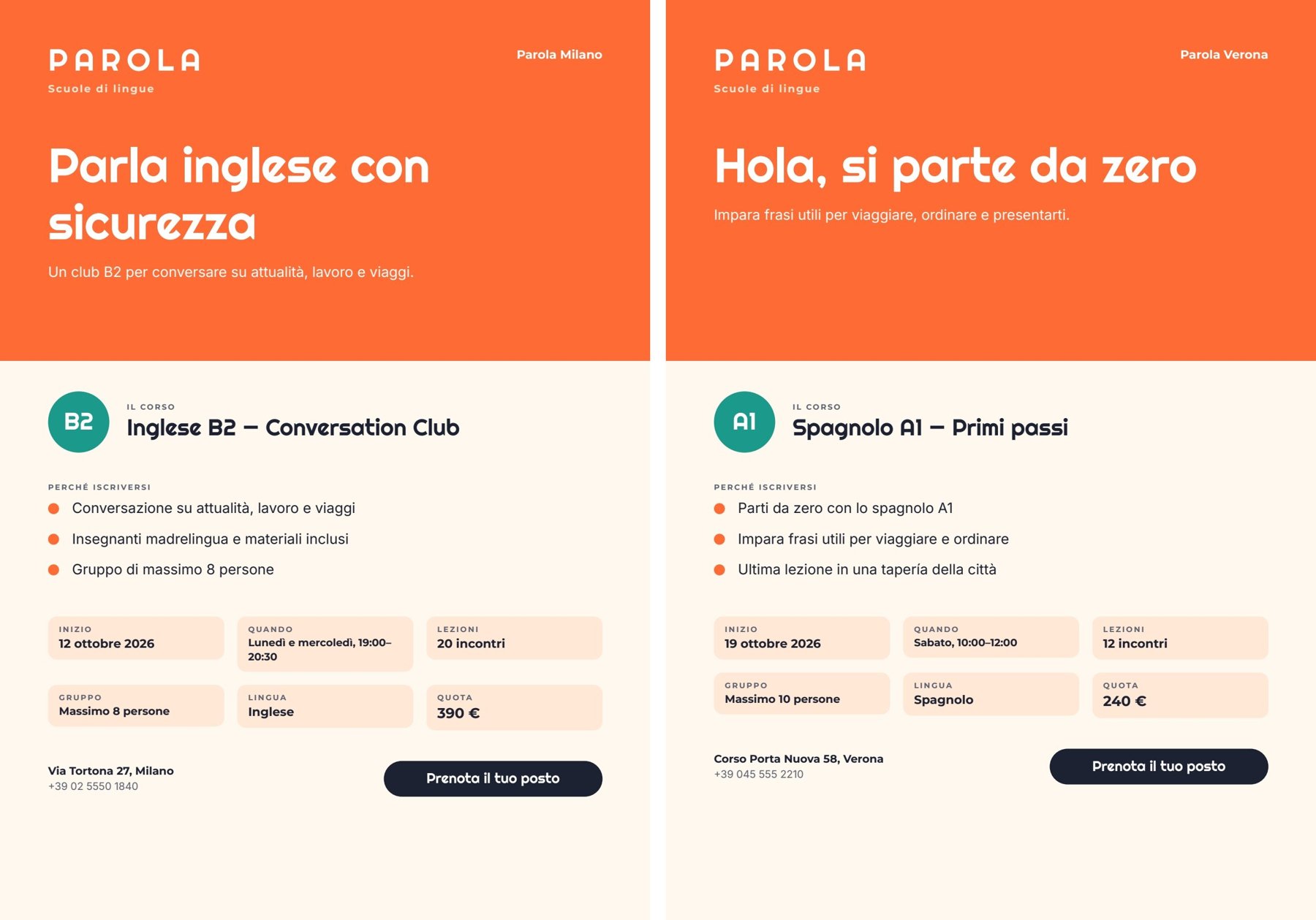
Two reference runs, one per workspace: the head office’s poster (Milan) and the school’s poster (Verona), each 15 seconds and 0.03 credits. PDFs: Milan · Verona. The AI words: Milan · Verona.
The case
Section titled “The case”Parola (a fictional network of language schools) has a precise identity: orange, a recognisable poster and a brand font, Righteous. The head office prepares the course poster once; the schools — Milan, Verona, … — each with their own workspace, use it for their own courses.
| Who | Workspace | What they do |
|---|---|---|
| Head office | its own | Uploads the brand font, designs the template and the workflow, tries them on the Milan course, shares the workflow including the font |
| Verona school | Parola Verona | Opens the link, sees that the font comes with the share, imports, publishes its copy and runs it with its own course |
Righteous is published under the SIL Open Font License 1.1, which allows it to be shared. It is not one of Madoo’s built-in fonts: for the platform it is a private font of the head office’s workspace.
What it shows
Section titled “What it shows”- Sharing is copying, not linking. The importer receives an independent copy of the workflow and the template in its own workspace, tied to the shared revision. The school’s changes do not touch the head office; a new revision at the head office does not change copies already imported — to get it, the school imports again from the link. The head office’s link follows the workflow: when the head office saves, the link shares the new version. See Sharing a template.
- The font travels only if the sharer takes responsibility for it. Private fonts do not follow a share by default: the receiver would need the same file or a substitute, and the poster would no longer be the head office’s. When sharing, the head office sees the list of non-built-in fonts in use and can include them by declaring that it holds the rights to share them with the link’s recipients; the declaration — who, when, which font versions — is recorded on the share. Without the declaration, a share with fonts is refused.
- The font file never passes through a public address. The share carries only the font’s data (name, version, fingerprint, variants). On import the server reads the files from the sharer’s workspace, checks their integrity and adds them to the receiver’s workspace through the same path as a normal upload (format check and security scan included). The installed font has the same fingerprint — exactly the same version — and every text of the copy points to the receiver’s font. See Fonts and weights.
- Facts from the school, words from the AI. The course record reaches the template on
data_1and wins; the AI writes the headline, the subheadline and three reasons, checked by a JSON Schema, and never touches dates, schedule, price or contacts.
What the school sees. Before importing, the font check says (preflight): Righteous — Included. Included by the person who shared, who declared holding the rights to share it. Importing adds it to this workspace’s fonts. Adding Righteous is preselected; the school can choose one of its own fonts instead. After the import (report) the school has a published copy of the workflow, a copy of the template that its composition node points to, and Righteous as a workspace font with the same fingerprint, referenced by the template’s five Righteous texts.
The template
Section titled “The template”A4 portrait, one page; Righteous for the logotype, headline, level, course name and button; Montserrat for labels and
values; Inter for body text. Orange #ff6b35, teal #1b998b, cream #ffe8d6.
| Area | Content | How it is built |
|---|---|---|
| Band | PAROLA · Scuole di lingue, the school, headline (AI) and subheadline (AI) | headline in Righteous 44 pt, at most two lines, shrinks if needed |
| Course | the level in a circle, the course name | a horizontal Layout |
| Why join | three reasons (AI) | a repeated list reasons (item.text), a drawn dot per row |
| Facts | start, when, lessons (20 incontri), group, language, fee (390 €) | six cells in two rows; lessons and price are number fields formatted by the template |
| Footer | address, phone, button Prenota il tuo posto | the button exists only when booking_url has a value |
| Field | Type | Required | Comes from |
|---|---|---|---|
headline, subhead |
text | yes | the AI’s JSON, validated (data_0) |
reasons |
list of { text } |
yes | the AI’s JSON, exactly three |
school, level, course_title, start_date, schedule, group_size, language, address, phone |
text | yes | the course record (data_1) |
lessons |
number (it-IT, suffix incontri) |
yes | the course record |
price |
number (EUR, it-IT, no decimals) |
yes | the course record |
booking_url |
text | no | the course record |
Design choices worth copying:
- Exact font references. Every Righteous text points to one font version by fingerprint; on import those references are rewritten to the receiver’s copy of the same file.
- Check every character in the brand font. Righteous has no
→arrow, and a missing glyph simply does not print: the arrows before the reasons and on the button disappeared from the first poster, without a warning. The template now uses drawn dots. - An optional link, an optional button: the template’s Verona sample set has no link, and its page has no button.
- Two sample sets in the template: Milano — Inglese B2 and Verona — Spagnolo A1, senza link.
The workflow
Section titled “The workflow”Course (from the school) ──► Course as text ──► Course for the writer ──► Write the headline and the reasons (AI, JSON) │ │ │ Words fit the poster (JSON Schema) │ │ └──────────────────────────────data_1──────────► Compose the poster ◄──data_0──┤──► Approved words │ ├──► Poster — PDF └──► Poster — image| Node | Type | Why |
|---|---|---|
| Course (from the school) | input/json_value |
The course record passes intact as one JSON value |
| Course as text, Course for the writer | utility/extract, text/template |
The record becomes the text of the prompt |
| Write the headline and the reasons | ai/text_generation, response_format: json_object, temperature 0.6 |
Italian, warm and direct; the rules forbid inventing facts and writing price, dates, schedule, address or contacts |
| Words fit the poster | utility/json_schema_validate, inline schema, mode fail |
headline at most 38 characters, subhead at most 88, exactly three reasons of at most 58 |
| Compose the poster | design/template_render, fixed revision, output both, missing_policy: fail_required, max_repeat: 3 |
Validated words on data_0, the course record on data_1, which wins |
| Outputs | output/pdf, output/image, output/json |
The PDF, the page image, the approved words |
The workflow is deliberately simple: the subject of this example is sharing.
Reading a run: Approved words is what the AI wrote; everything else on the poster comes from the course record. If the words do not fit, the run stops on Words fit the poster with every violation.
Cost: about 0.03 credits per run, the headline and reasons. Sharing, importing and installing the font are free.
Install it
Section titled “Install it”The example installs into your workspace with an API key, through the public API only — see Installing an example:
node madoo-install-example.mjs f08 --api <your Madoo API URL> --key <key.json>It uploads the Righteous font to your workspace, acknowledging its SIL Open Font License on your behalf, fills the
template’s font references with the uploaded font, and publishes the template and the workflow. To run it, use the Milan
course in run-inputs.json, or add --run (about 0.03 credits).
Sharing is done from the editor: share the workflow, include the font and declare your rights to share it.
Change it
Section titled “Change it”- Another course or school: change the course record; the facts print as they are.
- No booking link: leave
booking_urlout and the button disappears. - Your own brand font: upload it to the workspace and apply it to the Righteous texts; preview every symbol you use.
- Share without the font: the receiver then keeps their own copy of the font or chooses another one on import.
manifest · template · workflow · run inputs