

F10 — Course certificates in one PDF
A craft school closes an edition of its course and produces one PDF: the cover of the course register — course,
dates, hours, programme — followed by a certificate of attendance for each participant, with their hours, their final
project and the con merito seal only for those who earned it. The cover is composed by document/pdf, the
certificates by aggregate/pdf, the node that turns the items of an iteration into one PDF with a page per item. No AI:
every word comes from the school’s register.
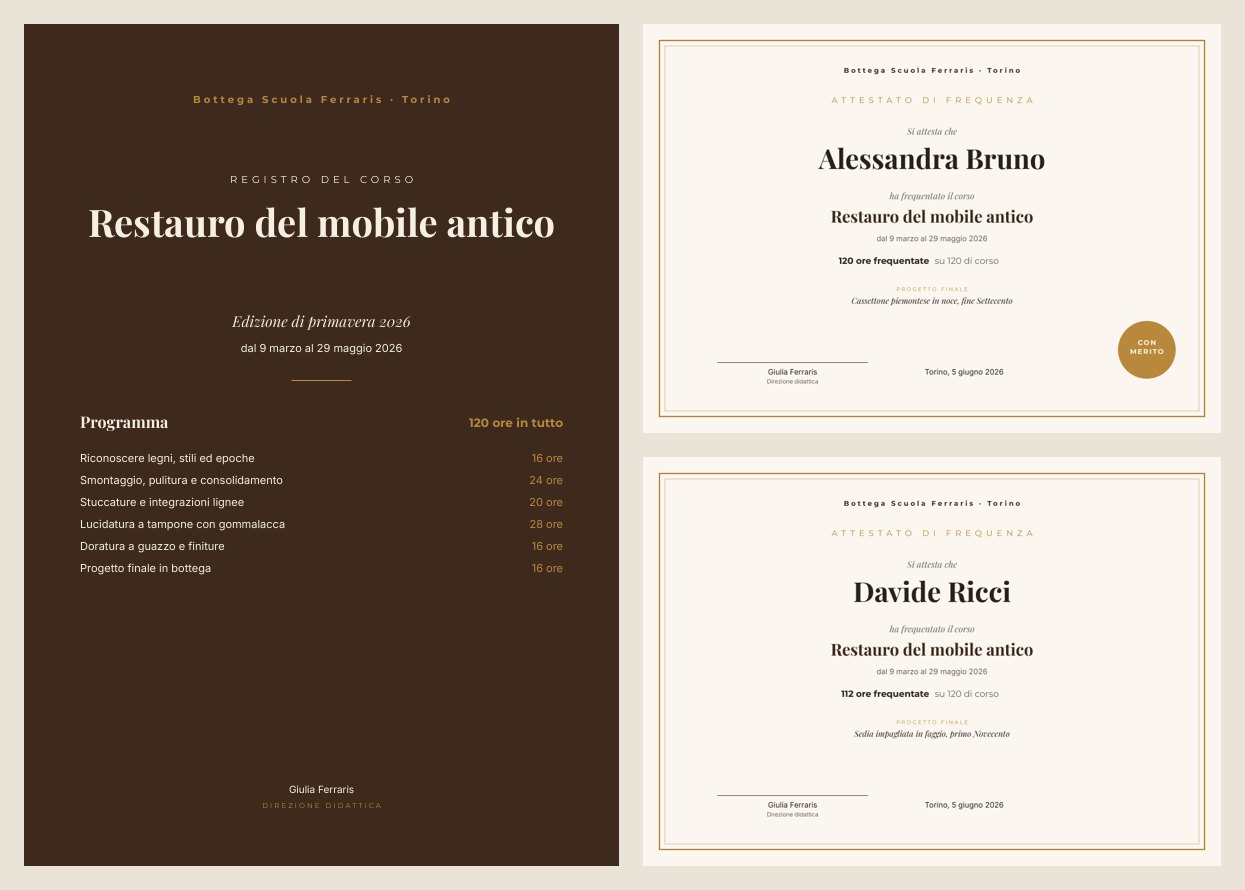
A reference run on a clean workspace, built and run with an API key only: 7 seconds, 0 credits, 7 pages (the cover and 6 certificates). PDF.
The case
Section titled “The case”Bottega Scuola Ferraris (fictional, in Turin) runs courses in antique furniture restoration. At the end of each edition the office prepares a certificate for every participant by hand in a word processor, plus the register cover to file. The sector is education, but the same structure fits conference badges, online-course certificates, catalogue sheets, exhibition labels: anything that is the same page, once for every item of a list.
| Input | Who provides it | In the workflow |
|---|---|---|
| Course data | the office: school, title, edition, dates, total hours, director, place and date of issue | seven simple inputs (input/text, input/number for the hours) holding the edition’s values |
| Programme | the course plan: modules and hours | Programme — input/json_value, a list |
| Participants | the register export: name, hours attended, distinction yes/no, final project | Participants — input/json_value, a list |
What it shows
Section titled “What it shows”- Three nodes fill a template; choose by the result you need.
design/template_renderfor one document from structured data (PDF, page images, layout report, PDF/X-4, always a fixed revision);document/pdffor one document with one port per field;aggregate/pdffor one PDF for a whole iteration, the template’s pages repeated for each item, with an optional cover and closing.utility/merge_pdfis not an alternative: it joins a fixed list of existing PDFs, not the items of an iteration. See One document per item, or one PDF for the whole list. - The ports are the template’s fields. In
document/pdfandaggregate/pdfevery field code of the template is an input port, typed like the field: text, number (the hours), yes/no (the distinction), list (the programme, read by a Repeat row), image. Connect only the fields to fill; the others stay as in the template. A connection to a field the template does not have is rejected, with the list of valid fields. - What is iterated changes; the rest repeats.
aggregate/pdfreceives each participant’s values from the enumerator and the course data from the simple inputs: the first change page by page, the second are the same on every certificate. See Iteration. - A fixed revision means a reproducible result. Both nodes set
template_revision. Without it,document/pdfandaggregate/pdfcompose the template’s current draft at run time — useful while trying the template, risky in production, because an edit to the draft changes the documents produced.
The templates
Section titled “The templates”Two templates, because aggregate/pdf repeats all the pages of its template for each item: the cover, which comes
out once, is a separate document. Playfair Display for titles and names, Montserrat for labels, Inter for text; walnut
#3e2a1e, cream #f6efe3, gold #b8893b. Numbers are formatted by the template in Italian, without a thousands
separator.
| Template | Format | Fields | How it is built |
|---|---|---|---|
| Register cover | A4 portrait, walnut background | school, course_title, edition, dates, course_hours (number, 120 ore in tutto), director, modules (list) |
the programme is a one-column Repeat: each row has item.name and item.hours (number, 16 ore); up to 12 modules, beyond that the render stops |
| Certificate of attendance | A4 landscape, cream paper with a double gold frame | participant, hours_attended (number, 118 ore frequentate), course_hours (su 120 di corso), project, distinction (yes/no), plus school, course_title, dates, director, issue_date |
the con merito seal is a circle with the condition distinction = true and a text bound to distinction in visibility mode |
Design choices worth copying:
- A separate template for pages that appear once. The cover reaches
aggregate/pdfasintroPdf; a closing page would arrive asoutroPdf. - Hours are numbers, with the words around them (ore frequentate, su … di corso) as prefix and suffix of the
format — the register passes
118, not a sentence. See Conditions, links and formats. - The distinction is a yes/no field that shows or hides the seal, not a text to type.
- Sample sets in both templates (Primavera 2026; Alessandra Bruno, Davide Ricci), so the editor shows real pages.
The workflow
Section titled “The workflow”School, Course, Edition, Dates, Course hours, Director ─┬──────────────────► Cover of the registry (document/pdf) ──introPdf──┐Programme (modules and hours) ──modules─────────────────┘ │School, Course, Dates, Course hours, Director, Place and date of issue ─────────────────────────────────────────────────────┤Participants ──► One participant at a time (enumerate/json) ──participant, hours_attended, distinction, project────────────┤ Cover + one certificate per participant (aggregate/pdf) ──► Certificates — PDF| Node | Type | Why |
|---|---|---|
| Course data (7) | input/text, input/number |
The edition’s values; the hours are a number, not a text |
| Programme (modules and hours) | input/json_value |
The list of modules, connected to the cover’s modules port |
| Participants (registry export) | input/json_value |
The register export |
| Cover of the registry | document/pdf, template_revision fixed |
The cover: every field is a port; modules receives the whole list |
| One participant at a time | enumerate/json |
One iteration per participant; exposes participant, hours_attended (number), distinction (yes/no), project |
| Cover + one certificate per participant | aggregate/pdf, template_revision fixed, outputName: attestati |
Fills the certificate once per participant; the course data come from the simple inputs; introPdf is the cover |
| Certificates — PDF | output/pdf |
The final PDF |
In the public workflow definition (REST, MCP, agent) the multi-page node is written like this:
{"id":"certificates","type":"aggregate/pdf","parameters":{ "template_id":"tpl_…","template_revision":1,"outputName":"attestati"}}Reading a run: one PDF, the cover first and then one certificate per participant, in the order of the register; the pages follow the number of participants.
Checks. The same cover rendered by document/pdf and by design/template_render with the same inputs gives
byte-identical page images (parity); without
template_revision, document/pdf shows an unpublished draft edit, with it the published revision. A workflow saved in
the editor reads back through the public API with template_id, is written back unchanged and runs
(round trip).
Cost: 0 credits — no AI; composing and joining PDFs is free.
Install it
Section titled “Install it”The example installs into your workspace with an API key, through the public API only — see Installing an example:
node madoo-install-example.mjs f10 --api <your Madoo API URL> --key <key.json>It publishes the two templates — the register cover and the certificate — and the workflow; there are no files to
upload. To run it, paste the programme and the participants from
run-inputs.json, or add --run (0 credits).
Change it
Section titled “Change it”- Another edition: change the course data and pass another register to Participants; the pages follow the number of participants.
- Without a cover: disconnect
introPdf; withoutroPdfadd a closing page, for example the course rules. - Another sector: event badges (one attendee per page), product sheets (one item per page), exhibition labels. The template and the list change, not the structure.
- Try a template change before publishing it: remove
template_revisionfrom one of the two nodes and run; then publish and set it again.
manifest · cover template · certificate template · workflow · run inputs