

F07 — Property listing from a photo bundle
An estate agency uploads the photo shoot of an apartment in one go (a bundle of eight photos) together with the sheet of certain facts; Madoo has the AI look at every photo, keeps in the gallery only the publishable ones, has the texts written from the sheet, and produces from the same template a two-page PDF sheet and a 4:5 social post. Price, areas, rooms and every other fact are printed as the agency wrote them.
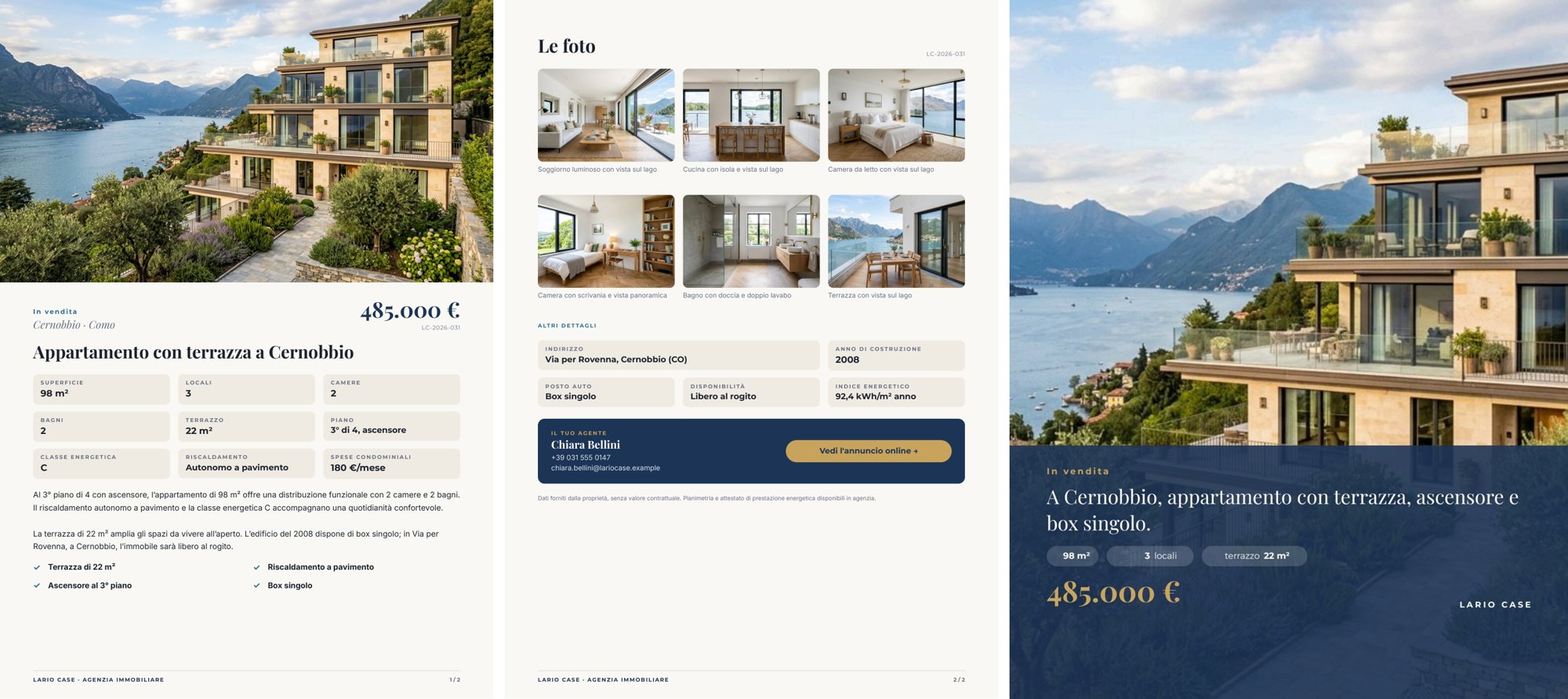
A reference run: 24 seconds, 0.17 credits. PDF · the social post · photo-by-photo review · the AI copy · layout report.
The case
Section titled “The case”Lario Case (a fictional agency on Lake Como) puts a three-room apartment with a terrace in Cernobbio on the market. The photographer delivers eight shots: seven good ones and one taken in a hurry — a dark, blurred, tilted hallway — as happens in every real shoot.
| Input | Who provides it | Example |
|---|---|---|
| Photo shoot | the photographer, through the agent: each photo with a declared role (hero for the cover, then living_room, kitchen, …) |
Photo shoot (bundle), the shoot saved as default value (spec) |
| Property sheet | the agency’s management system: contract, area, address, price, surface, rooms, bedrooms, bathrooms, floor, terrace, energy class and index, year, fees, heating, parking, availability, agent, link | one JSON object |
The bundle is not a convenience container: Madoo checks that every file belongs to the workspace and matches its checksum before any paid call, and every photo carries its identity, role and rights through to the result. The photos are the example’s starting data, generated once as a consistent shoot (same parquet, same windows, same lake).
What it shows
Section titled “What it shows”- A person chooses the cover, the AI filters the gallery. The agent declares in the bundle which photo is the cover
(
role: hero); the AI does not change it. For all the others the AI says whether they are publishable: in the reference run seven out of eight yes, the hallway no (“dark, motion-blurred, and partly obstructed by a coat”). Only the publishable photos that are not the cover go into the gallery: six photos. - Keeping only some rows of a list. For each photo
utility/filterlets the image through only if its condition is true; otherwise the value is absent. Thephotocolumn ofaggregate/jsonhaswhenAbsent: skip_row: a discarded photo leaves the list instead of becoming an empty row. The same mechanism, with the condition “is the cover”, produces the one-photo list the template uses as cover. The same run also produces the full photo-by-photo review, discarded photos included, for whoever has to review the shoot. See Iteration. - Facts from the sheet, words from the AI. The sheet reaches the render on
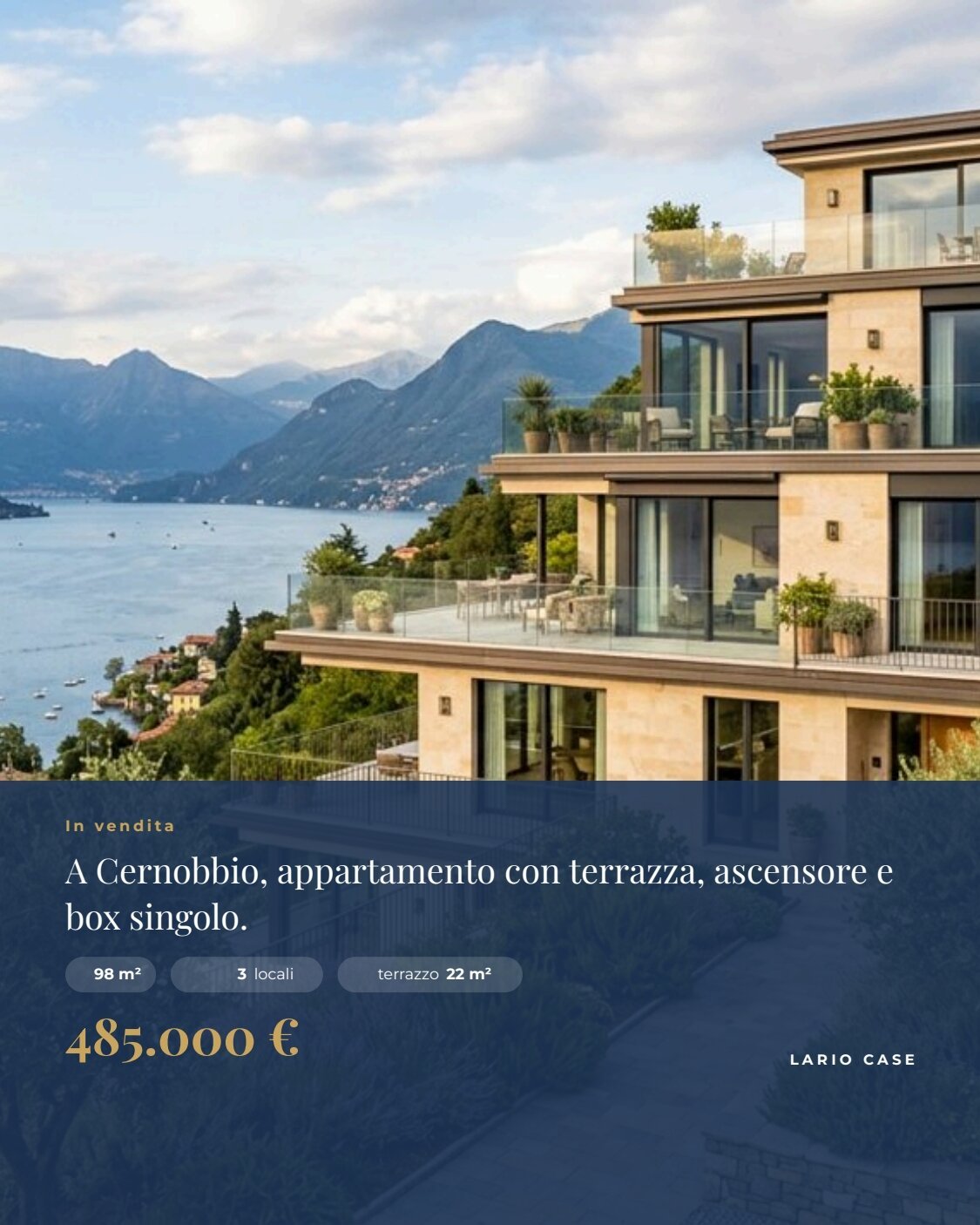
data_1and wins over any value with the same key in the AI copy ondata_0. The instructions let the AI use only the facts of the sheet, not write price, reference or contacts, write numbers as the sheet does and square metres as “m²”. A JSON Schema checks headline, description, four highlights and the line for the post. See Templates in workflows. - One template, two products. Pages 1–2 are the A4 sheet, page 3 is the 4:5 post (540 × 675 pt, an image of
1125 × 1406 px). Two render nodes read the same template with two page selections (
1-2→ PDF,3→ image). The post opens its own numbering sequence, so the sheet’s footer says “1 / 2” and “2 / 2”. See Numbering sequences and covers.
The template
Section titled “The template”Master page Listing pages (a footer with the agency and {{page}} / {{sequencePages}}) on the two A4 pages; the post
has no master. Playfair Display for price and titles, Montserrat for labels and values, Inter for text; lake blue
#1d3557, sand #f1ece3, gold #c8a45c.
| Page | Content | How it is built |
|---|---|---|
| Listing (A4) | full-width cover, contract and place, price, reference, AI headline, nine facts in a grid, AI description, four highlights | the list hero (one photo); below, a flowing Layout; the facts are cells with label and value; the list highlights in two columns |
| Photos and contacts (A4) | Le foto (up to nine, three per row, with AI caption), other details, the agent’s box with the button Vedi l’annuncio online →, disclaimer | the list gallery as a grid; the button exists only when there is a link |
| Social post (540 × 675 pt) | the cover, a band with contract, AI line, three facts, price and agency | the list hero full-page; numberingStart: 1 |
| Data | Field | How it prints |
|---|---|---|
| Price | price, number |
it-IT currency without decimals: 485.000 € |
| Surface, terrace | area_sqm, terrace_sqm, numbers |
suffix: 98 m², 22 m² |
| Condominium fees | condo_fees, number |
suffix: 180 €/mese |
| Year | year_built, number |
no separator: 2008 |
| Rooms in the post | rooms, number |
the same format as in the sheet; the word “locali” is a fixed text beside it |
| Photos | gallery[].photo, hero[].photo |
fill, rounded corners in the gallery (Images) |
| Link | listing_url (optional) |
the button’s link; without it the agent’s box has no button |
| AI copy | headline, description, highlights[].text, social_line |
text from the validated AI output |
| Photo captions | gallery[].caption |
from the photo analysis (Look at the photo), checked by Assessment is complete |
A field that appears in several places must have the same format everywhere (the engine checks it): that is why in the post “3 locali” and “terrazzo 22 m²” are a number in the sheet’s format plus a fixed word.
Design choices worth copying:
- The cover is a one-row list. Filtering produces a list, so the cover arrives as
herowith one photo and the template repeats it once — on the sheet and on the post. - The post opens its own numbering sequence (
numberingStart: 1) instead of counting in the sheet’s pages. - Three sample sets — Cernobbio (6 foto pubblicabili), Tre foto, senza link, Nove foto (il massimo) — show the full gallery and the agent’s box without a button.
The workflow
Section titled “The workflow”Photo shoot (bundle) ──► Verified photos ──► One photo at a time (one iteration per photo) photo ──► Look at the photo (AI) ──► Assessment is complete (JSON Schema) ──► Publishable? · Caption · Why role ──► Declared as cover? · Not the cover? Publishable? + Not the cover? ──► Publishable and not the cover photo ──► Keep for the gallery (if publishable and not the cover) ──► Gallery (skip_row) ◄── Caption photo ──► Keep as cover (if declared as cover) ──► Cover (skip_row) asset_id, role, judgement ──► Photo reviewProperty sheet ──► Sheet as text ──► Property sheet for the writer ──► Write the listing (AI) ──► Words fit the listingWords fit the listing ──data_0──┐Property sheet ──data_1─────────┼──► Compose the listing (pages 1-2) ──► PDF · Page images · Layout reportGallery, Cover ─────────────────┴──► Compose the social post (page 3) ──► Social post (4:5)| Node | Type | Why |
|---|---|---|
| Photo shoot (bundle) | input/bundle_manifest, validation: fail, verifyChecksum: always |
The shoot as one verified unit of work; an altered file stops the workflow before any spending |
| Verified photos | utility/extract (assets) |
The list of verified assets of the bundle |
| One photo at a time | enumerate/json |
Ports asset_id, role (from the metadata) and photo (the verified image); eight photos, eight iterations |
| Look at the photo | ai/image_analysis, json_object, temperature 0.1 |
Room, publishable yes/no, an Italian caption of what is visible, the reason |
| Assessment is complete | utility/json_schema_validate, mode fail |
Allowed values and lengths before the judgement decides anything |
| Publishable? / Caption / Why | utility/extract |
The three answers as separate values |
| Declared as cover? / Not the cover? | utility/predicate on the role (equals / not_equals hero) |
The choice of the cover stays with the agent |
| Publishable and not the cover | utility/boolean_combine, mode all |
The gallery’s condition |
| Keep for the gallery / Keep as cover | utility/filter |
The image passes or becomes absent |
| Gallery / Cover | aggregate/json, column photo with whenAbsent: skip_row |
Only the rows with a photo; the images of excluded rows are not even copied |
| Photo review | aggregate/json |
All eight photos, with judgement and reason |
| Sheet as text / Property sheet for the writer | utility/extract, text/template |
The sheet, as JSON text, in the writer’s message |
| Write the listing / Words fit the listing | ai/text_generation + utility/json_schema_validate |
Headline, description, highlights, the line for the post — from the sheet only |
| Compose the listing / Compose the social post | design/template_render, pages 1-2 (output both) and 3 (output image) |
Same template, same data, two products |
| Outputs | output/pdf, output/image, output/json ×4 |
The PDF, the page images, the post, the photo review, the approved words, the layout report |
Reading a run: Photo review lists all eight photos with listing_ready and the reason; the gallery has six
photos, the cover one. The description stays sober because the AI cannot add anything the sheet does not say: for a
richer text you need a richer sheet, not a freer AI.
Cost: 0.17 credits per run — eight photo judgements 0.08, the listing texts 0.09; bundle verification, filters and composition are free. The eight photos are starting data: 40 credits, once.
Install it
Section titled “Install it”The example installs into your workspace with an API key, through the public API only — see Installing an example:
node madoo-install-example.mjs f07 --api <your Madoo API URL> --key <key.json>It uploads the eight photos, composes the photo bundle from
photo-bundle-spec.json (Madoo derives type, size and
checksum), validates it and saves it as the default value of Photo shoot, then publishes the template and the
workflow. To run it, open the workflow and paste the property sheet from
run-inputs.json, or add --run (about 0.2 credits).
Change it
Section titled “Change it”- Another property: another bundle (the photos with their roles) and another sheet; up to nine photos in the gallery.
- Another cover: change the
herorole in the bundle, without touching the workflow. - A stricter or looser judgement: the instructions of Look at the photo say what makes a photo publishable.
- Improve or stage photos: photos judged to need work or virtual staging can go through an
ai/image_transformdeclared as a simulation, as in F06.
manifest · template · workflow · photo bundle spec · run inputs