

F13 — Event badges
The registration system exports the participants; the event has its colour and its logo. Madoo prints every badge in one PDF, ready for the printer: the name large enough to read from two metres, the company, the track, a band that says who the person is, a ribbon for VIP guests and a QR code to scan at the door — and the next event uses the same template with its own colour and logo.
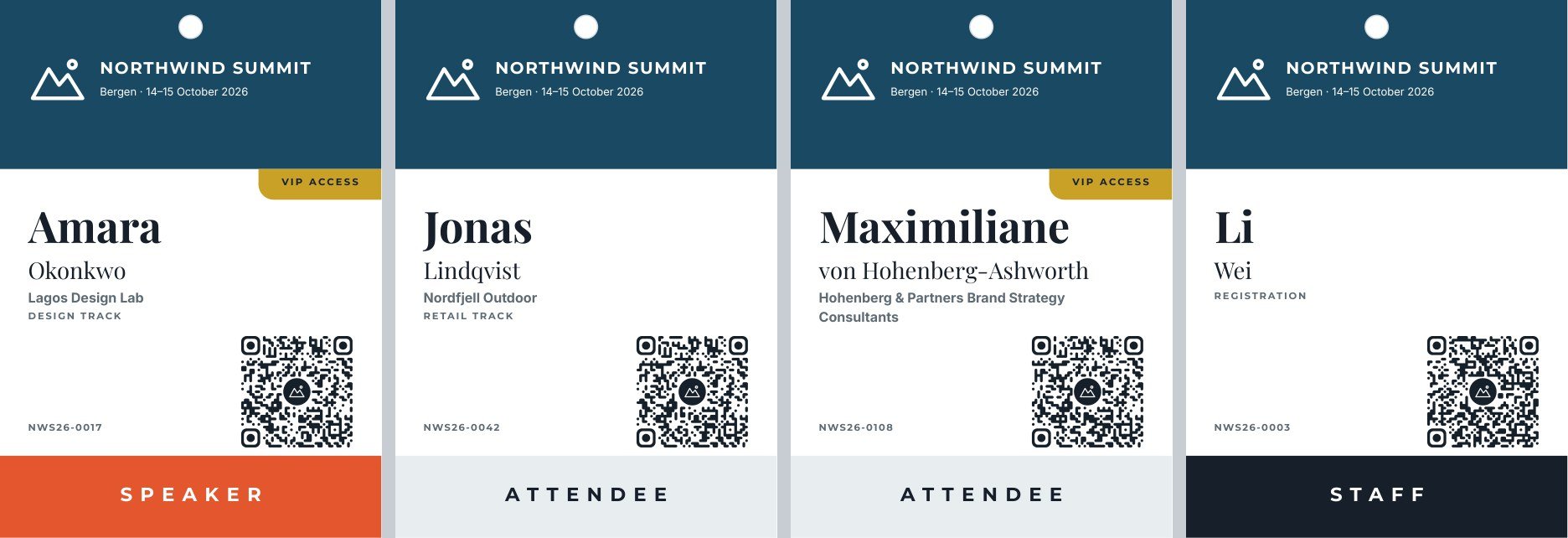
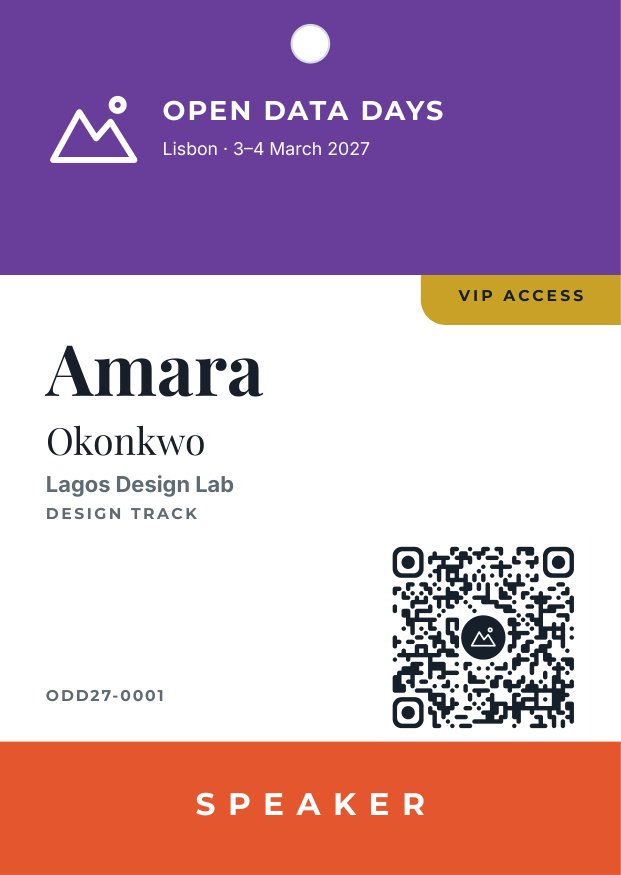
A reference run: 0 credits, four A6 pages in one PDF. The same template for another event, only the colour, the name and the participant changed: variant.
The case
Section titled “The case”Northwind Summit (fictional), a two-day conference in Bergen, prints the badges the night before.
| Input | Who provides it | Example |
|---|---|---|
| Participants | the registration system | first name, last name, company, role (speaker, staff, attendee), VIP yes/no, track, badge ID, check-in link |
| Event name, place and dates | the organisers | NORTHWIND SUMMIT, Bergen · 14–15 October 2026 |
| Event colour | the event’s brand | #1b4965 |
| Event logo | the event’s brand, as SVG | a white mountain mark |
What it shows
Section titled “What it shows”- One template for every event. The header band takes its colour from a colour field and the logo is an SVG image field: a new event changes two values, not the design. See Colour fields and An SVG as an image.
- A QR code per person, proven to scan. The QR Code node (
image/code) runs once per participant, after the enumerator, and draws the check-in link as a vector SVG with the event logo at its centre; it decodes every code it draws, so a code that does not scan stops the run instead of reaching the printer. The badge ID printed beside it is the fallback for manual check-in. See QR codes. - A band per role, chosen by conditions. Three bands sit at the bottom of the page, each shown only when
roleequals its value. The role has its own field — a hidden text — because a condition reads the template’s fields. - A yes/no field that shows a whole group. The VIP ribbon is a group (a gold shape and its label) carrying a yes/no field in visibility mode: it prints only for VIP guests. See Yes/no fields.
- Names of any length. First name and surname each take one line and shrink beyond it; a long company takes two lines and an ellipsis; an empty company or track leaves no gap, because the name block is a flowing Layout.
- One PDF for the printer. Multi-page PDF runs the template once per participant after the list is split — see One PDF for the whole list.
The template
Section titled “The template”A6 portrait (298 × 420 points), white; Playfair Display for the name, Montserrat for labels, Inter for text.
| Area | Content | How it is built |
|---|---|---|
| Header | the event colour, a lanyard hole, the logo, the event name and dates | a rectangle with the colour field event_color; image field event_logo (fit, aligned left); fields event_name (one line, shrinks) and event_dates |
| VIP ribbon | VIP ACCESS in a gold chip under the header | a group with the yes/no field vip, booleanMode: visibility, default false |
| Person | first name, surname, company, track | a flowing Layout: first_name (34 pt, one line, shrinks), last_name, company (up to 2 lines) and track, the last two shown only when not empty |
| Check-in | the QR code, the badge ID | image field checkin_qr (104 points square, fit, above the band on the right); field badge_id beside it |
| Role band | SPEAKER, STAFF or ATTENDEE | three groups at the bottom, each with the condition role equals its value |
| Field | Type | Required | Comes from |
|---|---|---|---|
first_name, last_name |
text | yes | each participant |
company, track |
text | no | each participant |
role |
text: speaker, staff or attendee |
yes | each participant |
vip |
yes/no (visibility) | no | each participant |
badge_id |
text | yes | each participant |
checkin_qr |
image (SVG) | yes | the QR Code node, from the participant’s check-in link |
event_name, event_dates |
text | yes | the event inputs |
event_color |
colour | yes | the event input |
event_logo |
image (SVG) | yes | the event input |
Design choices worth copying:
- Readable from a distance: the first name at 34 points, the surname smaller, the company muted.
- Colour means role: orange for speakers, dark for staff, light grey for attendees — the band is the first thing seen at a door.
- White text on the event colour: whatever colour the event brings must keep white readable; say so in the field’s description.
- A QR code of at least 3 cm, in white space, with the quiet zone the node draws around it: scanned at a door from a lanyard, a smaller code fails.
- Four sample sets cover a speaker with VIP, an attendee, the longest name and company with VIP, and a staff member without company.
The workflow
Section titled “The workflow”Participants (JSON value) ──► One badge per participant (enumerate/json) ──first_name, last_name, company, role, vip, track, badge_id──┐ └──checkin_url──► Check-in QR code (image/code) ──svg──────────────────────────────────────┤Event logo (SVG) ──────────────────────────────────────────────► (logo) ├──► All badges in one PDF ──► PDFEvent name, Place and dates, Event colour, Event logo ────────────────────────────────────────────────────────────────────────────────┘| Node | Type | Why |
|---|---|---|
| Participants | input/json_value |
The whole list as one JSON value |
| One badge per participant | enumerate/json |
Splits the list: one iteration per participant, with typed values (vip as a yes/no) |
| Event name, Place and dates, Event colour | input/text |
The same on every badge; the colour as #RRGGBB text into the colour field |
| Event logo (SVG) | input/image |
An SVG file uploaded to the workspace |
| Check-in QR code | image/code |
One code per participant from checkin_url: rounded modules, the event logo on a dark circle (Logo Background circle) so a white logo stays visible; error correction rises to H with a logo |
| All badges in one PDF | aggregate/pdf, fixed revision |
Runs the template once per participant and joins the pages in order; every field of the template is an input port |
| Badges — PDF | output/pdf |
One file for the printer |
Cost: 0 credits — no AI; composition is free.
Install it
Section titled “Install it”node madoo-install-example.mjs f13 --api <your Madoo API URL> --key <key.json>The installer uploads the SVG logo and publishes the template and the workflow. To run it, paste the participants from
run-inputs.json, or add --run (0 credits). See
Installing an example.
Change it
Section titled “Change it”- Another event: change the name, the dates, the colour and the logo — the template stays.
- Other roles: add a band group per role, each with its condition; describe the values in the
rolefield. - Another code content: connect the badge ID instead of the link, or a contact card, to the QR node’s
content; its style (shapes, colours, logo) is in the node’s parameters — see QR codes. - Another size: badges for 90 × 120 mm holders need a page of 255 × 340 points; move the elements accordingly.
manifest · template · workflow · run inputs