

Multi-page documents
A brochure, a catalogue, a proposal, a report: one template with several pages, sharing a header and a footer, numbered from the first inner page, with a cover that stands apart. This page covers pages, master pages, page numbers and numbering sequences, and pages whose height follows their content — each in the editor and in the document.
The pages lab is a four-page programme rendered from a three-page template: a cover without master or number; a contents page numbered i; a programme numbered from 1, whose list of events continued onto a fourth page by itself. Odd and even pages take different masters, with mirrored footers.
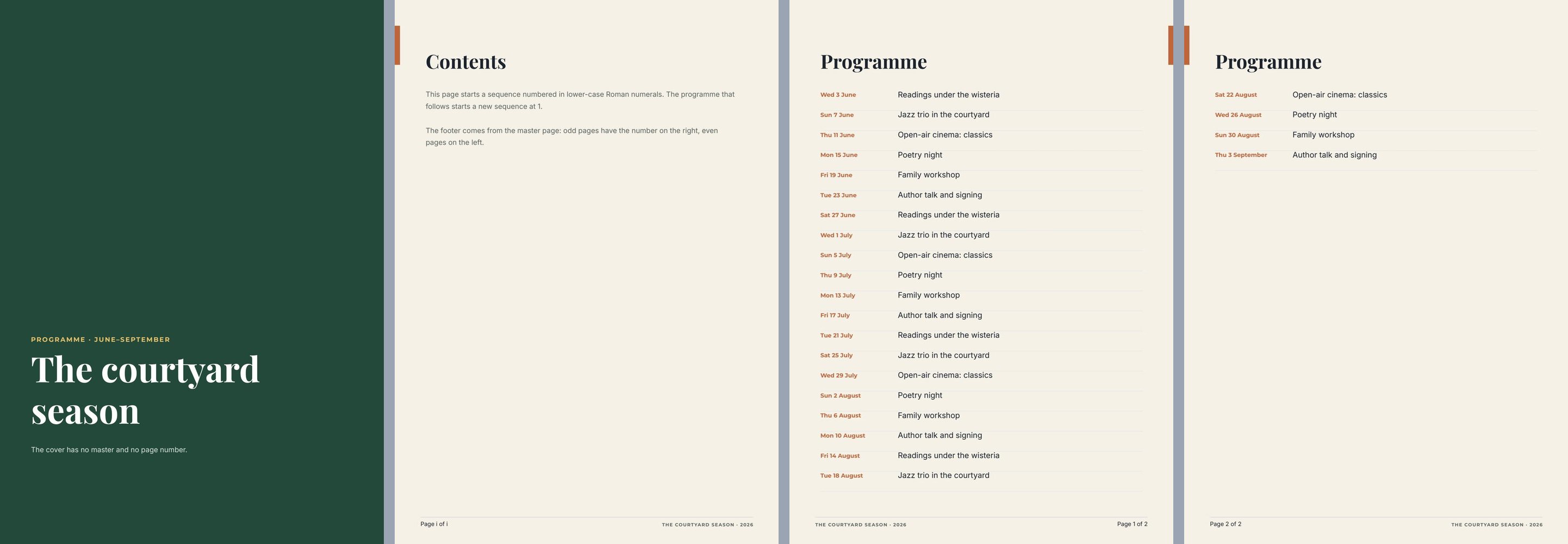
A document holds 1 to 100 pages in pages, printed in that order; a list that continues on new pages adds more
(up to 200 pages in one render). Each page has its own size, so a document can mix an A4 portrait body with a
landscape spread or a square insert — but a master applies only to pages of its size.
metadata at the root of the document sets the PDF’s properties:
"metadata": { "title": "The courtyard season 2026", "author": "Madoo documentation", "subject": "Multi-page lab", "keywords": "masters, numbering" }Master pages
Section titled “Master pages”A master page holds what several pages share — a footer rule, a brand line, a page number, an edge mark, a
background. It lives in masterPages (up to 32, not printed on their own) and has the shape of a page. Pages show
it without copying it: change the master, and every page that uses it changes.
- A master holds static content only: shapes, images, texts and page-number tokens. Fields, conditions and lists belong to the pages.
- A page draws its master below its own elements (
"masterLayer": "underlay", the default) or above them ("overlay", for a frame or a watermark that must stay on top). "useMasterBackground": truegives the page the master’s background instead of its own.
Assigning masters
Section titled “Assigning masters”Masters are assigned automatically by page position or by hand:
| On the master | automaticRule |
Applies to |
|---|---|---|
all |
every page of its size set to automatic | |
odd, even |
odd or even pages — for mirrored footers; they override all |
|
none |
no page automatically |
| On the page | masterAssignment |
Meaning |
|---|---|---|
automatic |
takes the master whose rule matches its final position | |
manual |
takes masterPageId, whatever its position |
|
none |
no master — a cover, a back cover |
Positions are counted in the final document: when a list adds pages, the new pages take their master by their own position, so odd and even alternate correctly. Only one master per rule and page size.
"masterPages": [ { "id": "5c0deddd-0000-4000-8000-000000000101", "name": "Inner — odd", "width": 595, "height": 842, "pageFormat": "A4", "backgroundColor": "#f6f1e7", "automaticRule": "odd", "elements": [ { "$type": "text", "id": "5c0deddd-0000-4000-8000-000000000102", "name": "Page number", "left": 355, "top": 806, "width": 200, "height": 14, "text": "Page {{page}} of {{sequencePages}}", "fontFamily": "Inter", "fontSize": 9, "fill": "#1c2430", "textAlign": "right" } ] }, { "id": "5c0deddd-0000-4000-8000-000000000103", "name": "Inner — even", "width": 595, "height": 842, "pageFormat": "A4", "backgroundColor": "#f6f1e7", "automaticRule": "even", "elements": [ { "$type": "text", "id": "5c0deddd-0000-4000-8000-000000000104", "name": "Page number", "left": 40, "top": 806, "width": 200, "height": 14, "text": "Page {{page}} of {{sequencePages}}", "fontFamily": "Inter", "fontSize": 9, "fill": "#1c2430" } ] }]Page numbers
Section titled “Page numbers”A page number is a text containing tokens, resolved after lists have added their pages:
| Token | Prints |
|---|---|
{{page}} |
the number of this page in its numbering sequence |
{{pages}} |
the pages of the whole document |
{{sequencePages}} |
the pages of the current numbering sequence |
The rest of the text is yours: Page {{page}} of {{pages}}, {{page}} / {{sequencePages}}, — {{page}} —. Put it on
a master to number every page, or on a single page.
Numbering sequences and covers
Section titled “Numbering sequences and covers”"numberingStart": 1on a page starts a new sequence there;"numberingStyle"isarabic,roman_upperorroman_lower. The lab’s contents page starts a Roman sequence (i), the programme an Arabic one (1, 2) — and{{sequencePages}}counts only the pages of its sequence."hidePageNumber": truehides the page-number texts of one page without breaking the count — a cover counted as page 1 but printed without a number.- A cover with no master at all:
"masterAssignment": "none".
{ "id": "5c0deddd-0000-4000-8000-000000000105", "name": "Programme", "width": 595, "height": 842, "pageFormat": "A4", "backgroundColor": "#f6f1e7", "masterAssignment": "automatic", "numberingStart": 1, "numberingStyle": "arabic", "elements": [] }In the editor
The panel of page thumbnails has two tabs, Pages and Masters. Under Masters, Create master page adds a master of the selected page’s size; open it to draw its content (the canvas shows Editing shared master), and set Apply this master automatically (Never, All pages, Odd pages, Even pages). A page’s Page settings has a Shared layout section: Master choice (Automatic by page position, a specific master, or No master (exception)), Use master background and Shared artwork position (Behind page content or In front of page content); Assign pages in bulk changes a range of pages at once. Page numbering — Start new numbering here, Start at, Style — starts a sequence. The page’s menu has Hide page number on this page. Page numbers are added with the Special fields tool, or by typing the tokens through Fields in the text bar.
Pages that grow with their content
Section titled “Pages that grow with their content”- A list that continues on new pages adds copies of its page — header, background and master included — until every row has printed (see Repeated lists). The copies are numbered and take their masters by position.
- A page whose height follows its content — for images shared on screen, a story, a receipt, a summary of variable
length:
fitHeightmakes the printed page endbottomMarginpoints below its lowest printed element, never taller than drawn. The same 540 × 960 page prints about 130 points tall with a short note and about 315 with a long one:
{ "id": "5c0deeee-0000-4000-8000-000000000001", "name": "Story", "width": 540, "height": 960, "backgroundColor": "#23493a", "fitHeight": { "bottomMargin": 32 }, "elements": [] }Draw the page at its tallest; put its content in a flowing Layout so that it has a real bottom; use it for page images and screen PDFs rather than for print.
In the editor
In Page settings, tick Height follows the content; the canvas marks where the page ends with the active sample set.
Recipes
Section titled “Recipes”| You need | Do |
|---|---|
| A footer on every inner page | A master with automaticRule: "all"; the cover with masterAssignment: "none" |
| Mirrored footers for a printed booklet | Two masters, odd and even, with the number on the outer edge |
| Front matter in Roman numerals | numberingStart: 1 with roman_lower on the first front page, then arabic at 1 on the first chapter page |
| A cover counted but not numbered | hidePageNumber: true on the cover |
| A watermark over every page | A master with the watermark, pages with masterLayer: "overlay" |
| A catalogue of any length with a footer | A list with continue_page, the footer on an all master |
| A social story or receipt of variable length | One page with fitHeight, content in a flowing Layout |
Checklist
Section titled “Checklist”- Shared artwork lives on masters, not copied on every page.
- Masters and the pages they apply to have the same size.
- The cover and back cover have
masterAssignment: "none"or a number hidden on purpose. - Page numbers use tokens, and sequences restart where the reader expects.
- A preview with the longest data shows the added pages numbered and with their masters.