

F04B — Illustrated summary
The “illustrated edition” variant of F04 — Visual summary of a book: the same page, but every key idea has its own small picture, drawn by the AI in the style of the main illustration. The pictures are generated in parallel, one per idea, and return next to their idea before the page is composed.
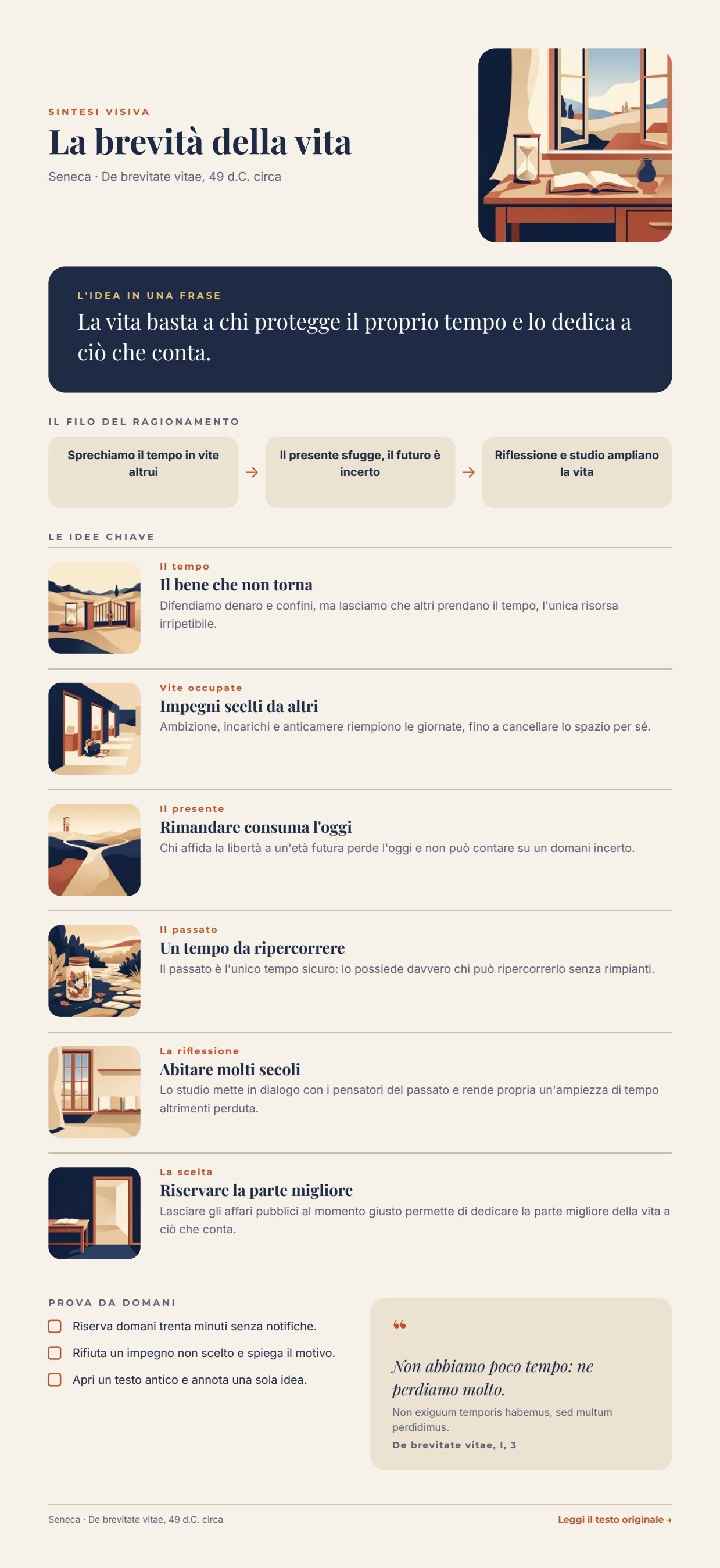
A reference run: 74 seconds, 35.20 credits (one main illustration and six pictures). The page is 1296 pt tall (at most 1440) because it follows its content. PDF · the AI structure · ideas with their pictures · layout report.

The case
Section titled “The case”The F04 summary is already laid out to be looked at; with one picture per idea it becomes truly visual — every concept has a symbol to remember. It costs about seven times more, though (5 credits per picture, 25 to 35 credits per summary against about 5 for F04) and takes about half a minute longer. These are two product levels — summary and illustrated edition — and the example shows what each one costs.
The inputs are those of F04: a reading app sends the summary of a book, and its catalogue provides the facts of the work. The example uses Seneca’s De brevitate vitae, a public-domain text.
| Input | Who provides it | Example |
|---|---|---|
| Book summary | the reading app (or the editors) | Book summary, text with a default value |
| Facts of the work | the app’s catalogue | title, author and date, the quote in Latin with translation and reference, link to the original text — one JSON object |
What it shows
Section titled “What it shows”- A list fans out, then comes back together.
enumerate/jsonopens the list of key ideas: each idea becomes an iteration, and the pictures are drawn in parallel.aggregate/jsonjoins every idea to its picture, in the order of the ideas, and the list reaches the template as one value. See Iteration. - The text model writes the scene, not the style. Every idea has a
scenefield (in English, for the image model): one or two symbolic objects in a simple setting, different from one idea to the next. The instructions forbid describing a style. - The style is fixed by the workflow and anchored to an image. Every picture instruction is a fixed
text/template: same technique, same palette, same light as the reference image; do not copy its objects or its composition; show only this scene; full-bleed, no frame. The reference is the main illustration, passed toai/image_transform. This is what holds six separately generated pictures together. - Facts win over the AI, as in F04. The facts of the work reach the template as a second data object and win over any value with the same key. See Templates in workflows.
The template
Section titled “The template”The same design as F04 — 595 pt wide, Playfair Display, Montserrat and Inter, night blue #1f2a44, paper #f6f2ea,
terracotta #c2542d, sand #ebe2d1, gold #e9c46a — with two changes: every idea row gains a 76 pt square picture with
rounded corners on the left, and the maximum page height goes to 1440 pt. The page follows its content
(Pages that grow with their content).
| Area | Content | How it is built |
|---|---|---|
| Header | title, author and date; the main illustration | a horizontal Layout: texts on the left, illustration as the background of a rounded 160 × 160 Layout |
| The idea in one sentence | big_idea |
a dark Layout with rounded corners, up to 3 lines |
| The line of reasoning | step_1, step_2, step_3 |
three equal boxes joined by arrows |
| Key ideas | key_ideas: 4 to 6 { tag, title, text, image } |
a repeated list in the page’s flowing Layout; each row has the picture item.image (fill), then theme and title, then the explanation (Lists) |
| Try tomorrow | actions: 3 { text } |
a list of rows with a checkbox |
| Quote | quote_translation, quote_original (optional), quote_source |
the Latin appears only when present |
| Footer | author and date; read the original text → | the link reads source_url; without it, text and link disappear |
| Field | Type | Required | Comes from |
|---|---|---|---|
big_idea, step_1–step_3 |
text | yes | the AI’s JSON, validated (data_0) |
actions |
list of { text } |
yes | the AI’s JSON, validated (data_0) |
key_ideas |
list of { tag, title, text, image } |
yes | Ideas with their pictures (its own port) |
illustration |
image | yes | the main illustration (its own port) |
title, byline, quote_translation, quote_source |
text | yes | Facts of the work (data_1, wins over data_0) |
quote_original, source_url |
text | no | Facts of the work |
Design choices worth copying:
- The field port wins over the data object.
data_0also carries akey_ideaslist, without pictures; thekey_ideasport receives the recomposed list and prevails. - “Full-bleed, no frame”. Without this sentence the model framed almost every picture with a cream border, which inside the rounded boxes looked like a frame within a frame.
- Three sample sets in the template, with the pictures of the reference run as samples: the editor shows a realistic page.
The workflow
Section titled “The workflow”Book summary ──► Build the illustrated summary (AI, JSON) ──► Summary fits the page (JSON Schema)Summary fits the page ──data_0──────────────────────────────────────────────────────► Compose the pageSummary fits the page ──► Illustration prompt ──► Draw the main illustration ──illustration──► Compose the pageSummary fits the page ──► One key idea at a time (one iteration per idea) scene ──► Picture instruction ──► Draw the idea in the same style ◄──images_0── Draw the main illustration tag, title, text ──► Ideas with their pictures ◄──image── Draw the idea in the same styleIdeas with their pictures ──key_ideas──► Compose the pageFacts of the work ──data_1──► Compose the pageCompose the page (Render Document Template) ──► PDF · Image · Layout report| Node | Type | Why |
|---|---|---|
| Book summary | input/text |
The summary as the app has it |
| Facts of the work | input/json_value |
One object with the verified facts |
| Build the illustrated summary | ai/text_generation, JSON |
Structure, ideas and one scene per idea; no invented facts or quotes |
| Summary fits the page | utility/json_schema_validate, inline, mode fail |
Fields, number of ideas and actions, lengths computed on the page |
| Illustration prompt / Draw the main illustration | utility/extract, ai/text_to_image 1_1 |
The square main illustration, which is also the style reference |
| One key idea at a time | enumerate/json (arrayPath: key_ideas) |
Each idea becomes an iteration, with tag, title, text and scene as ports |
| Picture instruction | text/template |
The fixed style plus this idea’s scene ([scene]) |
| Draw the idea in the same style | ai/image_transform, 1:1, default model |
The main illustration on images_0 as style reference; iterations run in parallel |
| Ideas with their pictures | aggregate/json (columns tag, title, text as text, image as image) |
Joins each idea to its picture, in order; the pictures become permanent paths |
| Compose the page | design/template_render, output both, max_repeat: 6, missing_policy: fail_required |
AI structure on data_0, facts on data_1, the recomposed list on key_ideas, the illustration on its port |
| Outputs | output/pdf, output/image ×2, output/json ×3 |
The PDF, the page image, the main illustration, the approved summary, the ideas with their pictures, the layout report |
Reading a run: Ideas with their pictures shows each idea with the path of its picture; the pictures are generated in parallel, so the run takes little longer than F04. If the schema fails, the run stops on Summary fits the page before any image is paid for.
Cost: about 25–35 credits per run — the structure about 0.2, the main illustration 5, the idea pictures 20–30 (5 each, four to six ideas); validation, extraction and composition are free. Two reference runs took 81 and 74 seconds.
Install it
Section titled “Install it”The example installs into your workspace with an API key, through the public API only — see Installing an example:
node madoo-install-example.mjs f04b --api <your Madoo API URL> --key <key.json>It publishes the template and the workflow; there are no files to upload. To run it, open the workflow and paste the
facts of the work from run-inputs.json into Facts of the work,
or add --run (about 25–35 credits).
Change it
Section titled “Change it”- Another book: change the summary and the facts of the work; omit
quote_originalwhen there is no original language to quote. - Another style: change the fixed text of Picture instruction and the main illustration prompt together; the reference image carries the style to every picture.
- Cheaper: without pictures, the same page is F04, about 5 credits.
manifest · template · workflow · run inputs