

F11 — Restaurant menu
The kitchen decides tonight’s dishes; the menu prints them. Madoo takes the menu as data — sections, dishes, descriptions, prices, dietary flags — and lays it out on an A4 page, with a two-sentence note from the chef written by the AI from the chef’s own shorthand. Change the menu, and the page follows: a section with five dishes pushes the rest down, a dish without tags takes one line less.
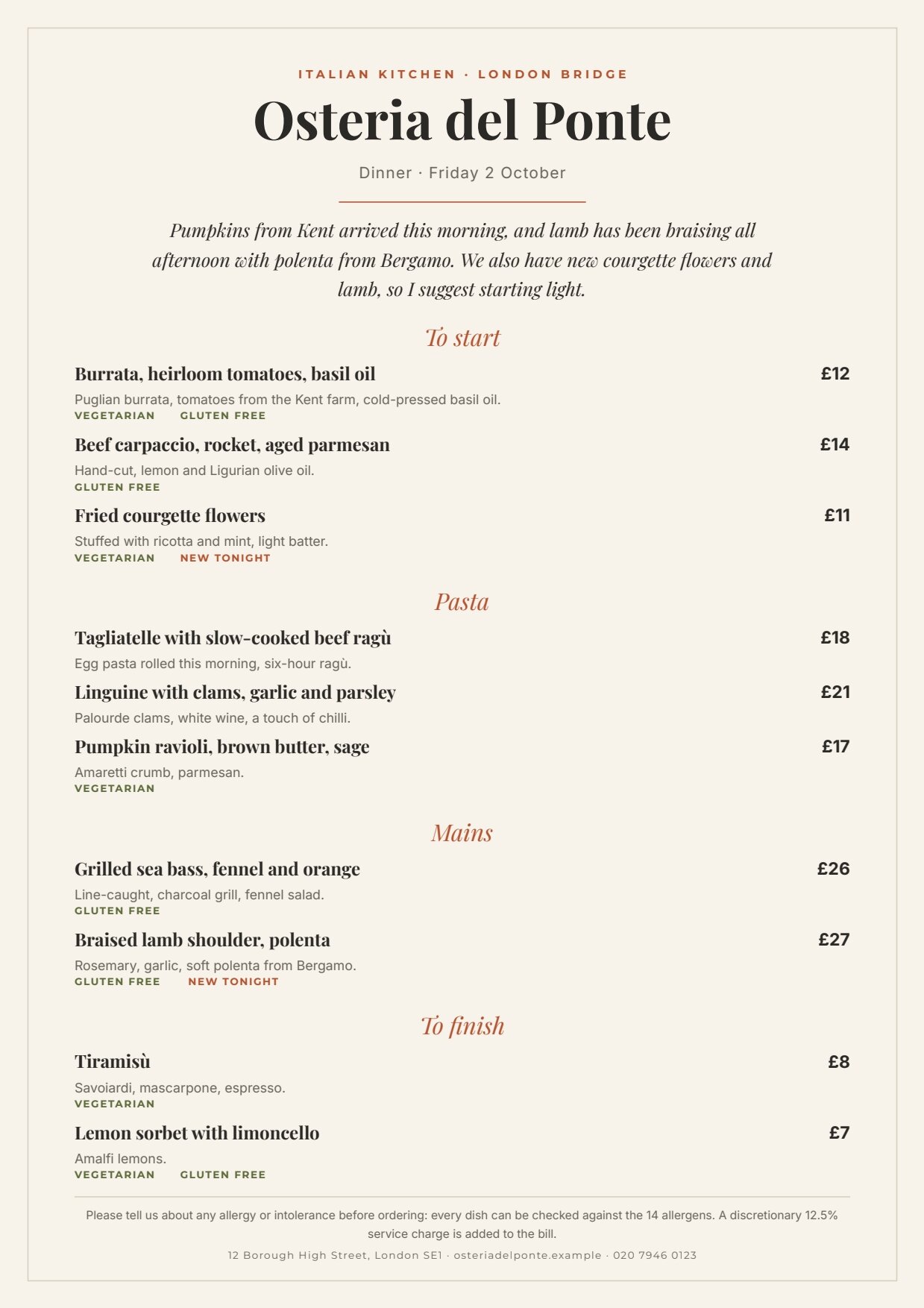
A reference run: 0.02 credits, a few seconds. PDF · the chef’s note · layout report.
The case
Section titled “The case”Osteria del Ponte (fictional), an Italian restaurant in London, prints a new evening menu every day. The dishes change with the market; the page must always look the same.
| Input | Who provides it | Example |
|---|---|---|
| Menu | the kitchen’s system, or whoever writes the menu | four sections, ten dishes: name, description, price, vegetarian, gluten free, new tonight |
| Chef’s notes | the chef, in shorthand | pumpkins arrived from kent this morning (ravioli). lamb braised all afternoon… |
| Service and date | the front of house | Dinner · Friday 2 October |
What it shows
Section titled “What it shows”- A list inside a list. The menu is a list of sections, and each section holds its own list of dishes: the inner
list reads
item.dishesof its section. See A list inside each item. - Everything grows from its smallest size. Every row is drawn at its smallest height — a one-line name, a one-line description — and grows with its content: a long dish name takes two lines and the dishes below move down.
- Optional tags that take no space when absent. VEGETARIAN, GLUTEN FREE and NEW TONIGHT are small labels shown only when the dish says so; their row has its own condition — any of the three flags — so a dish without tags takes one line less. See Conditions.
- The AI writes the note, not the menu. Dishes and prices go from the input to the page untouched. The AI only turns the chef’s shorthand into two sentences, forbidden to mention prices or dishes the notes do not name, and a JSON Schema checks the length (60–220 characters) before the page is composed.
The template
Section titled “The template”A4 portrait on warm paper #f7f2ea with a thin frame; Playfair Display for the name, the note, the sections and the
dishes; Inter for descriptions and prices; Montserrat for small labels; terracotta #b5532f and olive #5e6b3a.
| Area | Content | How it is built |
|---|---|---|
| Header | ITALIAN KITCHEN · LONDON BRIDGE, Osteria del Ponte, service and date, a short terracotta rule | fixed texts and the field service_line |
| Body | the chef’s note, then the sections | a flowing Layout: the note (up to 3 lines, centred) pushes the menu down |
| Sections | a title in italics, then its dishes | the list sections (at most 5); each row is a Layout with the title and the inner list |
| Dishes | name and price on one line, the description, the tags | the inner list item.dishes (at most 8 per section); each row a Layout: a horizontal head (name, price), the description (up to 2 lines), the tags row |
| Footer | allergen notice, service charge, address | fixed texts under a rule |
| Field | Type | Required | Comes from |
|---|---|---|---|
service_line |
text | yes | the Service and date input |
chef_note |
text | yes | the AI’s JSON, validated (the data port) |
sections |
list of { title, dishes } |
yes | the Menu input |
each dish: name, description, price |
text, text, number (GBP) | — | the menu |
each dish: vegetarian, gluten_free, new |
yes/no, declared on the dish list | — | the menu |
Design choices worth copying:
- Prices are numbers formatted by the template —
£12,£27— never text from the kitchen. - The flags are declared on the dish list (
itemFields), so the contract tells a workflow or an agent that each dish may carry them, although no element prints them as text. - The page has a ceiling: at most five sections and eight dishes each; a menu that does not fit stops the render instead of printing over the footer. The second sample set, a short lunch menu, shows the same template half empty and still balanced.
The workflow
Section titled “The workflow”Chef's notes ──► Write the chef's note (AI, JSON) ──► Note fits the page (JSON Schema) ──data──► Compose the menu ──► PDFMenu (JSON value) ──sections──────────────────────────────────────────────────────────────► (Render ──► ImageService and date ──service_line───────────────────────────────────────────────────────────► Document ──► Layout report └──► Chef's note (output) Template)| Node | Type | Why |
|---|---|---|
| Chef’s notes | input/text, multi-line |
The chef writes as they speak |
| Menu | input/json_value |
The whole menu as one JSON value — not split into one run per dish |
| Service and date | input/text |
A plain field of the page |
| Write the chef’s note | ai/text_generation, response_format: json_object, temperature 0.5, 1,500 tokens |
Two sentences from the notes only; the token budget leaves room for the model’s reasoning — with 300 tokens a reasoning model can stop before answering |
| Note fits the page | utility/json_schema_validate, inline schema, mode fail |
One field, 60–220 characters |
| Compose the menu | design/template_render, fixed revision, output both, missing_policy: fail_required |
The note on data, the menu and the service line on their field ports |
| Outputs | output/pdf, output/image, output/json ×2 |
The menu, its image, the layout report and the approved note |
Reading a run: the Chef’s note output is what the AI wrote; the layout report shows status: passed and fourteen
list rows (four sections and ten dishes).
Cost: about 0.02 credits per run, the chef’s note; composing the page is free.
Install it
Section titled “Install it”node madoo-install-example.mjs f11 --api <your Madoo API URL> --key <key.json>The installer publishes the template and the workflow; the example has no files to upload. To run it, paste the menu
from run-inputs.json into Menu, or add --run. See
Installing an example.
Change it
Section titled “Change it”- Tonight’s menu: change the sections and dishes; up to five sections of eight dishes.
- Another restaurant: duplicate the template and change the name, the kicker, the colours and the footer.
- Another language: the prices follow the format of the price field (
en-GB, GBP); for euros and Italian separators change its currency and locale. - Lunch and dinner: the same template serves both; the second sample set shows a short lunch menu.
manifest · template · workflow · run inputs