

F12 — Quote from the quoting system
The quoting system knows the lines, the quantities, the prices and the totals; the estimator knows what the client asked for during the visit. Madoo puts both on the letterhead: the system’s quote as it is — every figure untouched — and an introduction written by the AI from the estimator’s notes.
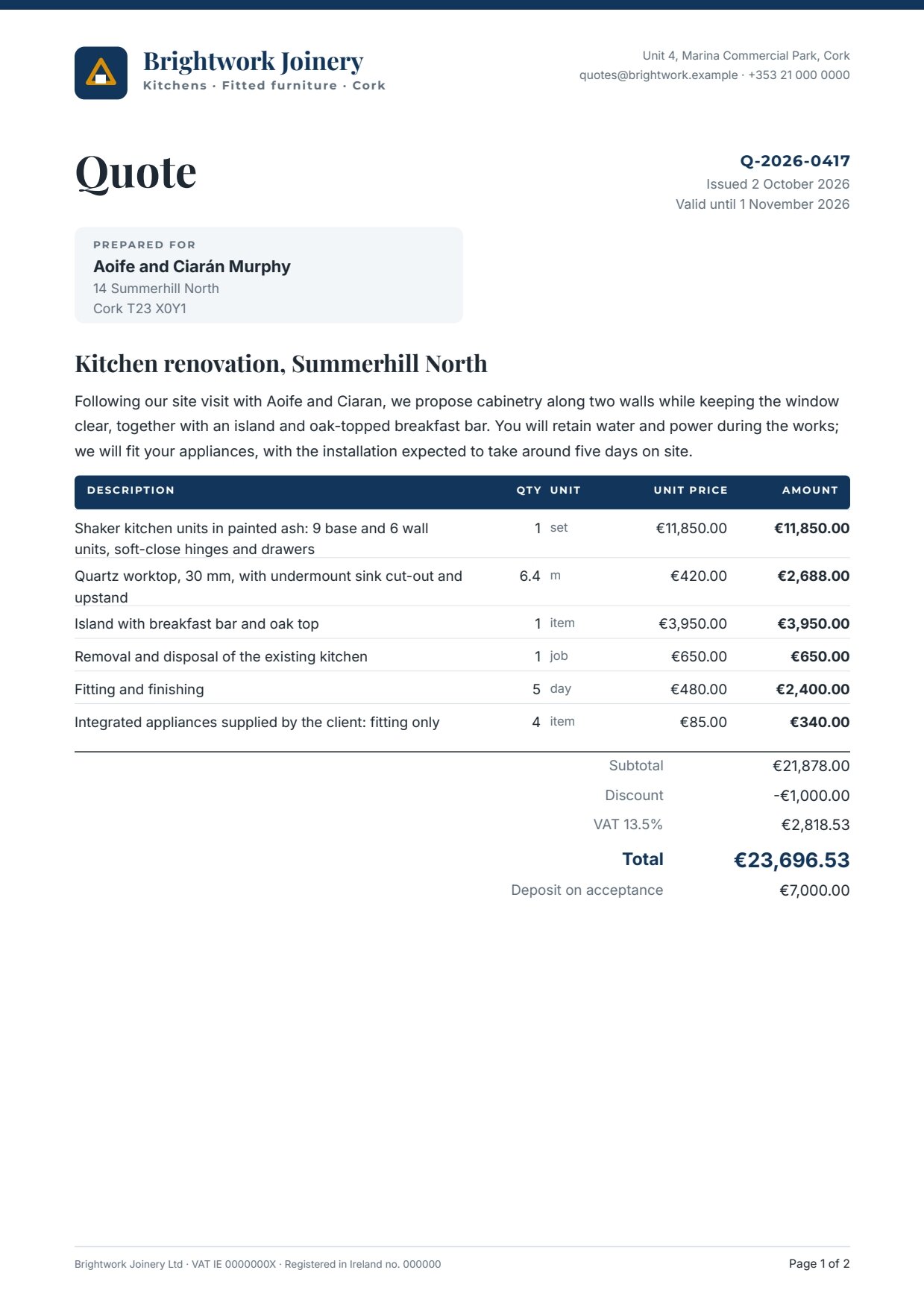
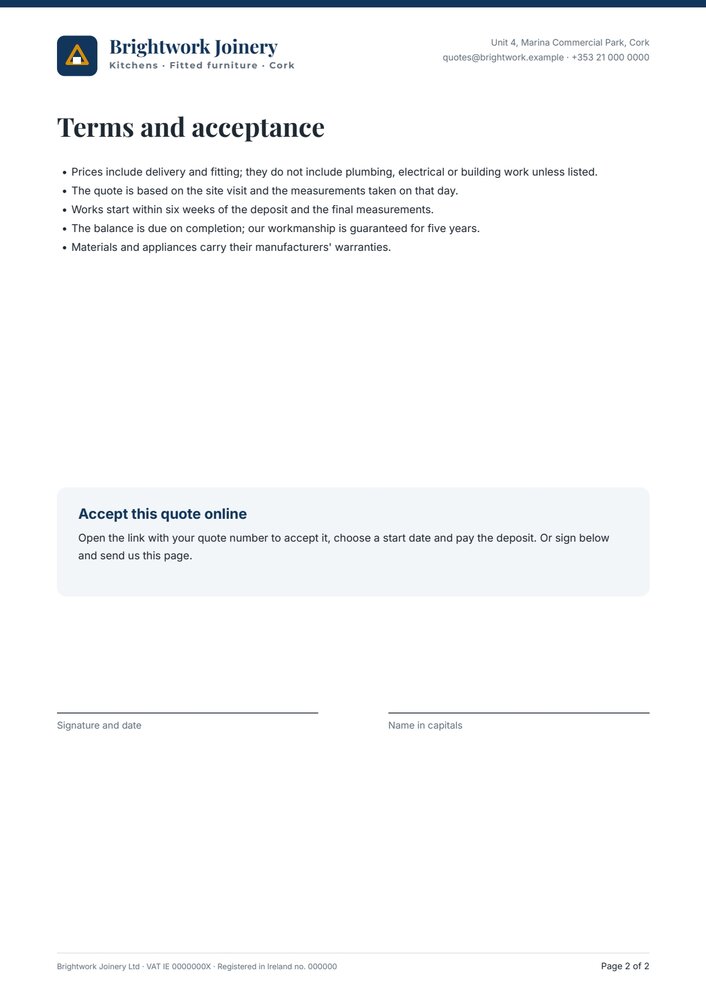
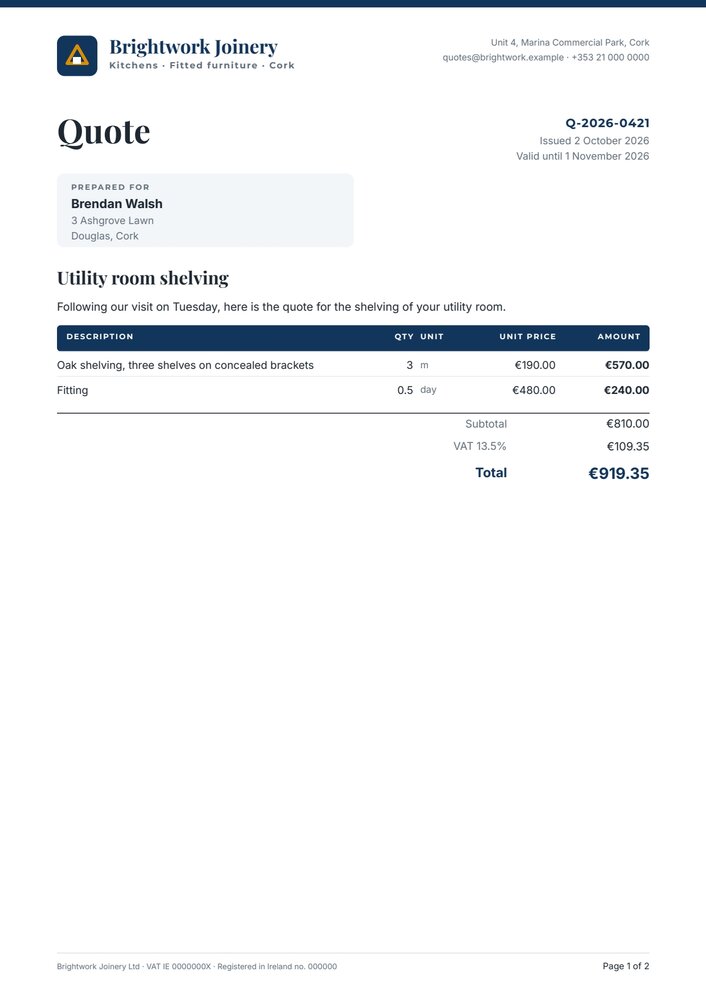
A reference run: 0.02 credits. PDF, two pages · the introduction · layout report · exact previews of the terms page and of a short job without discount or deposit.
The case
Section titled “The case”Brightwork Joinery (fictional), a kitchen fitter in Cork, sends a quote after every site visit.
| Input | Who provides it | Example |
|---|---|---|
| Quote | the quoting system, as one JSON object | number, dates, client, project, six line items, subtotal, discount, VAT rate and amount, total, deposit |
| Site-visit notes | the estimator, in shorthand | two walls of units, keep the window free, want an island w breakfast bar (oak top)… |
What it shows
Section titled “What it shows”- Two data objects, facts last. The AI’s introduction goes to
data_0, the system’s quote todata_1; objects are merged in order, so on any shared key the quote wins — and the AI never sees a price. See Keep AI copy and verified facts apart. - The amounts come from the system, on purpose. Subtotal, VAT and total are facts of the quoting system, like the prices: a document that recalculated them could disagree with the invoice by a rounding. The template only formats them. When a source gives only the lines, compute the totals with Calculate — see Amounts computed in the workflow.
- Rows that grow, numbers that stay aligned. A long description takes up to three lines; quantity, unit, unit price
and amount stay on its first line, and the rows below move down. A description longer than three lines stops the
render (
beyond: fail) rather than print a quote with a cut line. - Lines that appear only when they apply. The discount prints only when it is below zero, the deposit only when it is above zero; in a flowing Layout they leave no gap. See Conditions.
- A letterhead as a master page. Logo, company, contacts, the footer and Page 1 of 2 come from one master page applied to every page. See Multi-page documents.
The template
Section titled “The template”A4, two pages; white paper, navy #12355b, a grey tint #f3f6f9 for panels; Playfair Display for titles, Inter for text
and figures, Montserrat for small labels. Amounts in euros, en-IE (€11,850.00).
| Area | Content | How it is built |
|---|---|---|
| Letterhead (master) | band, SVG logo, company name and line, contacts, footer, page number | a master page with automaticRule: all; Page {{page}} of {{pages}} |
| Title block | Quote, quote number, issue and validity dates, the client panel | fields quote_number, issue_date, valid_until, client_name, client_address (two lines with a line break) |
| Body | project, introduction, table, totals | a flowing Layout: the project (up to 2 lines), the introduction (up to 5 lines, fail beyond), then the table and the totals |
| Table | a navy header, then one row per line item | a Layout without gaps holding the header and the list items (at most 14, fail beyond); each row a rule, the description and four figures |
| Totals | subtotal, discount, VAT, total, deposit | a Layout of right-aligned lines; the VAT label is the rate field itself, formatted as a percentage with the prefix VAT |
| Page 2 | terms as a bulleted list, the acceptance panel with a link, signature lines | rich text with a bullet list; the link https://brightwork.example/quotes/{quote_number} |
| Field | Type | Required | Comes from |
|---|---|---|---|
introduction |
text | yes | the AI’s JSON, validated (data_0) |
quote_number, issue_date, valid_until, client_name, client_address, project |
text | yes | the quote (data_1) |
items |
list of { description, quantity, unit, unit_price, amount } |
yes | the quote |
subtotal, vat, total |
number (EUR) | yes | the quote |
vat_rate |
number (percentage: 0.135 prints VAT 13.5%) |
yes | the quote |
discount, deposit |
number (EUR) | no | the quote; printed only when below / above zero |
Design choices worth copying:
- The rate is a number, not a label.
vat_rateis0.135and the template prints VAT 13.5%: a different rate never needs a different template. - Numbers are aligned on the right in their own columns, bold for the amount of each line and for the total.
- Two sample sets: the full kitchen quote, and a short job without discount or deposit that shows the conditional lines disappearing.
The workflow
Section titled “The workflow”Site-visit notes ──► Write the introduction (AI, JSON) ──► Introduction fits the page (JSON Schema) ──data_0──► Compose the quote ──► PDFQuote from the system (JSON value) ──data_1──────────────────────────────────────────────────────────────► (Render ──► First page └──► Introduction (output) Document ──► Layout report Template)| Node | Type | Why |
|---|---|---|
| Site-visit notes | input/text, multi-line |
The estimator writes as they speak |
| Quote from the system | input/json_value |
The whole quote as one JSON object, keyed by the template’s field codes |
| Write the introduction | ai/text_generation, response_format: json_object, temperature 0.4, 1,500 tokens |
Two or three sentences from the notes only; no prices, amounts or guarantees |
| Introduction fits the page | utility/json_schema_validate, inline schema, mode fail |
One field, 120–420 characters |
| Compose the quote | design/template_render, fixed revision, output both, page_selection: 1 |
The introduction on data_0, the quote on data_1; the PDF has both pages, the image is the first |
| Outputs | output/pdf, output/image, output/json ×2 |
The quote, its first page, the layout report and the approved introduction |
Reading a run: the Introduction output is what the AI wrote; the layout report shows status: passed and six list
rows.
Cost: about 0.02 credits per run, the introduction; composing the quote is free.
Install it
Section titled “Install it”node madoo-install-example.mjs f12 --api <your Madoo API URL> --key <key.json>The installer publishes the template and the workflow; there are no files to upload. To run it, paste the quote from
run-inputs.json into Quote from the system, or add
--run. See Installing an example.
Change it
Section titled “Change it”- An invoice: duplicate the template, change the title and the terms, add fields for the invoice date and the payment details; the table and the totals stay.
- Another company: change the master page — logo, name, contacts, footer — and every page follows.
- Another currency or country: change the currency and locale of the amount formats; the VAT rate is data.
- Only the lines from the system: add Calculate nodes between the quote and the template —
round(sum(quote.items[*].amount), 2)for the subtotal,round(subtotal * vat_rate, 2)for the VAT — and connect their results to thesubtotal,vatandtotalfield ports. - Longer quotes: the list takes up to 14 lines on the page; for longer ones, give the list more room or move the terms to a later page.
manifest · template · workflow · run inputs