

F09 — Poster built by an agent through MCP
An AI agent, connected to Madoo through the MCP server and never opening the editor, designs the poster template of a cultural festival, publishes it, builds the workflow that fills it from the programme — an invitation written by the AI, an AI illustration, one line per evening — runs it, looks at the result and corrects it. The outcome is the same kind of document as the examples made in the editor.
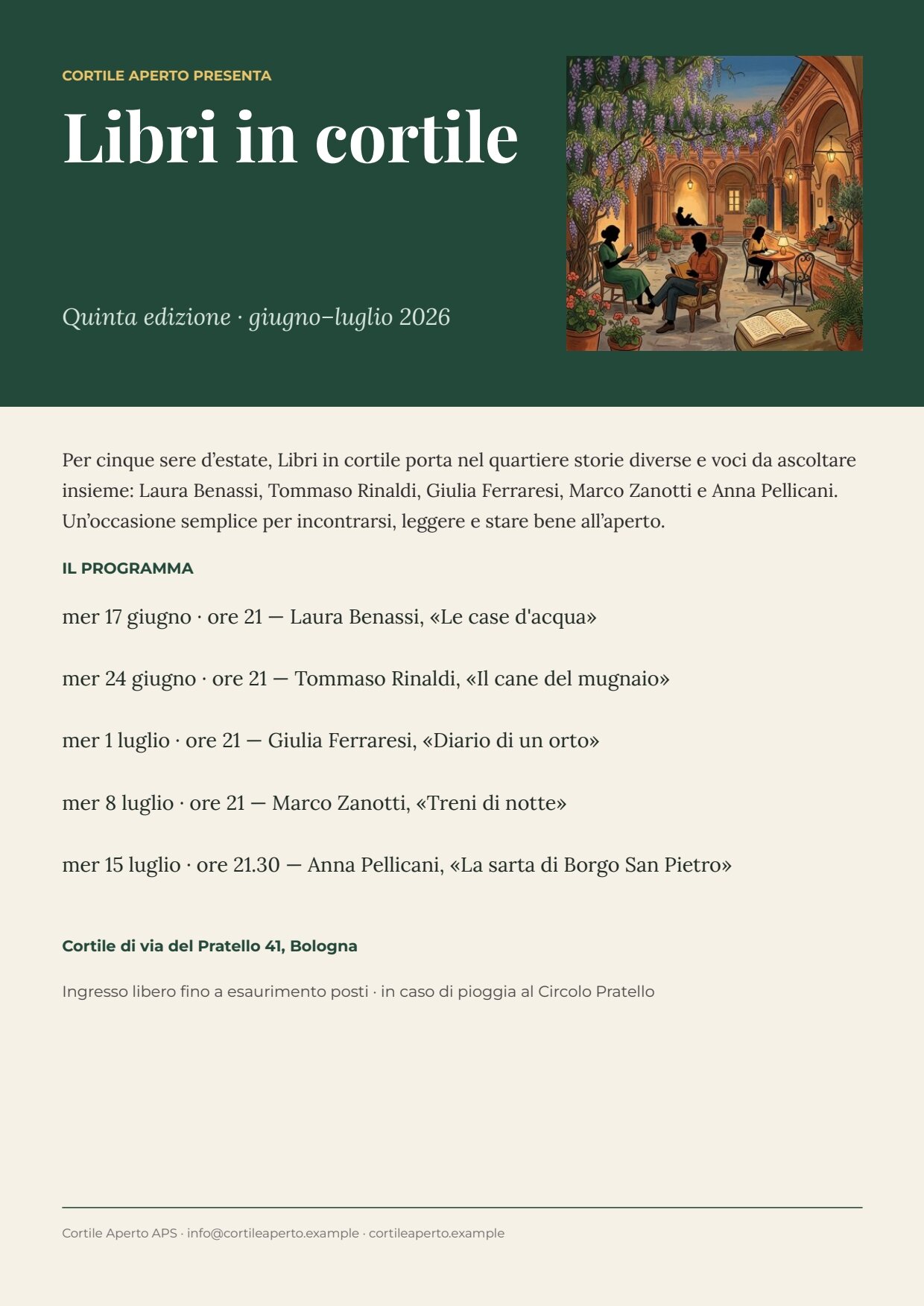
A reference run of the second version of the workflow: 36 seconds, 5.04 credits. The build took 90 MCP calls in about 10 minutes. PDF · the approved words.
The case
Section titled “The case”Cortile Aperto (a fictional association in Bologna) organises Libri in cortile every summer: five evenings with authors in a courtyard of via del Pratello. Every year it needs the same A4 poster with the new programme. The person in charge does not want to learn an editor: they ask their AI assistant to “make the festival poster, and a way to redo it next year from the programme”.
| Input | Who provides it | Example |
|---|---|---|
| Festival programme | the association, as JSON it already keeps | title, edition, theme, venue, entry note, contacts and the list of evenings (date, time, author, book) |
What it shows
Section titled “What it shows”- Surface parity. What can be done in the editor must be possible from REST, MCP and the agent with the same
result. Here no step goes through the interface: the template is built with the design-template tools, the workflow
with
create_workflow_draft; validation, estimate, publishing, execution and reading the result are MCP calls too. - The agent works like a careful person: discover, try, look. It does not guess names: it searches the nodes
(
search_node_types), reads their exact contract (get_node_type) and reads each tool’s schema before using it. Before publishing the template it looks at the exact preview of a sample set (JPEG images of the page) and checks publish readiness; after the first run it looks at the poster and corrects the workflow. - The same rules as the other examples. The facts — dates, authors, venue, entry, contacts — come from the programme without passing through a model; the AI writes only the invitation and the illustration idea, inside a JSON Schema that limits their length; the workflow uses a published revision of the template.
- Only the access it needs. The agent uses a workspace API key with only the scopes required (catalogue, workflows,
executions, assets, templates) on the MCP server’s API-key endpoint,
/mcp/automation.
What the agent did, in order (tool names as recorded during the build):
| Step | MCP tools | What happens |
|---|---|---|
| Get oriented | initialize (server instructions), list_fonts |
Reads the usage rules and the available fonts |
| The template | create_design_template_draft, update_design_template_page, add_design_template_rectangle / _text / _image_placeholder / _repeating_text_list / _line |
A cream A4 page, a green band with kicker, title, edition and illustration; below, invitation, programme, venue, entry and contacts |
| The fields | configure_design_template_text_placeholder |
Title, edition, invitation, venue, entry and contacts become required fields; the illustration is an image field; the programme is a repeated list (evenings, row key line) |
| The style | update_design_template_element |
Playfair Display for the title, Lora for the texts, Montserrat for labels and notes; the title takes at most two lines and shrinks beyond |
| The flow | arrange_design_template_elements |
Invitation, label, programme, venue and entry in a flowing Layout: a longer invitation pushes the rest down |
| The test | add_design_template_sample_set, preview_design_template_sample_set, get_design_template_publish_readiness |
Sample Edizione 2026, preview inspected, spacing corrected, no blockers |
| Publish | publish_design_template_draft |
Revision 1 |
| The workflow | search_node_types, get_node_type, validate_workflow, create_workflow_draft, publish_workflow |
Valid at the first attempt: 14 nodes, 19 connections |
| Run | get_workflow (execution contract), estimate_execution, execute_workflow, get_execution, get_execution_result |
Estimate 6 credits, run, PDF and image |
| Correct | update_workflow, execute_workflow |
A second version of the prompt after looking at the first poster |
Since then the MCP server groups related commands into families: the same work today uses edit_design_template_page
(operation update), configure_design_template_element_placeholder (type text), edit_design_template_sample_set
(operation add) and get_design_template (view readiness). An agent can also create a template from one complete
document instead of element by element — see Templates and the
document model.
The correction after the first poster. The first run was correct but had two defects the agent saw in the image: the
invitation repeated the free entry and the rain plan, already printed below, and the illustration had a white
frame inside its box. The agent changed only the system prompt (“the poster already prints evenings, venue, entry and
rain plan separately: do not repeat them”; “full bleed to the edges, no frame”) with update_workflow; the published
workflow moved to version 2, and its run is the one shown above.
Gaps found during the build, in order of weight. Several have since been closed — rows with several elements (the
add commands take a parent_id, see Repeated lists), letter spacing
(char_spacing), and workspace fonts in list_fonts — and a template is best written as one complete document:
- A Repeat row could hold only one text with the element tools:
add_design_template_repeating_text_listcreated a list with one field per row, with no way to add other elements inside the row or a Layout. In the editor the programme row would have had the date in bold and author and book in italic, aligned; here it is a sentence composed by the workflow. - An opaque error on missing required arguments:
update_design_template_pagewithoutformatandorientationanswered only “An error occurred invoking ‘update_design_template_page’”. - Searching nodes by capability sometimes misses: “iterate json array items” did not return
enumerate/json; a search by family (“enumerate”) did. - Missing text properties in
update_design_template_elementat the time: letter spacing, and undocumented values offill_paint.type. list_fontslisted only built-in fonts, not the workspace’s private ones.- The 64 KiB limit of sample sets also applies to sample images: the agent had to shrink its test illustration; the error did not say which value exceeded it.
- No tool for folders: the agent’s workflow was created at the root.
- The execution contract’s example for a JSON input was a string (
"\"Replace with your value\""); for an object,{}would be clearer.
What works well, and matters most for an agent: draft ETags prevent overwriting someone else’s changes, idempotency keys make every step repeatable, the exact preview lets the agent look before publishing, workflow validation is precise, and the execution contract gives the exact input keys and where to read the outputs.
The template
Section titled “The template”One A4 page, three families: Playfair Display, Lora, Montserrat.
| Area | Content | How it is built |
|---|---|---|
| Band | forest green, kicker CORTILE APERTO PRESENTA, title, edition, square illustration | fields title, edition; image field illustration, fills its box |
| Body | the invitation (up to 6 lines), the label IL PROGRAMMA, the evenings, the venue, the entry note | a flowing Layout; evenings is a Repeat of text rows, at most 6, an error beyond |
| Footer | a rule and the contacts | field contacts |
| Field | Type | Required | Comes from |
|---|---|---|---|
intro |
text | yes | the AI’s JSON, validated (data_0) |
title, edition, venue, entry_note, contacts |
text | yes | the programme, printed as it is (data_1) |
illustration |
image | yes | the generated illustration (its own port) |
evenings |
list of { line } |
yes | the rows composed by the workflow (its own port) |
Design choice worth copying: the programme row is one sentence composed by the workflow
([date] · ore [time] — [author], «[book]»), not a row of four laid-out fields — a consequence of the first gap above.
The workflow
Section titled “The workflow”Festival programme ──► Programme as text ──► Brief ──► Write the invitation and the illustration idea (AI, JSON) │ │ │ Words fit the poster (JSON Schema) ──data_0──┐ │ └─► Illustration idea ──► Paint the illustration ──illustration──┤ ├──► One evening at a time (enumerate) ──► Programme row ──► Evenings list (aggregate) ──evenings──────────────────────────┤ └──────────────────────────────────────────────data_1────────────────────────────────────────────────────► Compose the poster ──► PDF, image + approved words| Node | Type | Why |
|---|---|---|
| Programma della rassegna (festival programme) | input/json_value |
The only input |
| Programma come testo, Programma per la redazione | utility/extract, text/template |
The programme becomes the text of the prompt |
| Scrivi l’invito e l’idea di illustrazione (write the invitation and the illustration idea) | ai/text_generation, response_format: json_object, temperature 0.6 |
intro in Italian and image_prompt in English; only facts from the programme, nothing already printed elsewhere |
| Le parole stanno nella locandina (the words fit the poster) | utility/json_schema_validate, inline schema, mode fail |
Exactly two keys; intro between 120 and 340 characters |
| Idea di illustrazione, Disegna l’illustrazione | utility/extract, ai/text_to_image, 1_1 |
A square, full-bleed editorial illustration, no text |
| Una serata alla volta (one evening at a time) | enumerate/json over evenings |
One item per evening: date, time, author, book |
| Riga del programma, Elenco serate | text/template, aggregate/json (column line) |
One sentence per evening, collected back into the list the template expects — see Iteration |
| Componi la locandina (compose the poster) | design/template_render, fixed revision, output both, missing_policy: fail_required, max_repeat: 6 |
Approved words and programme on the data port (data_0, data_1), evenings and illustration on their named ports |
| Outputs | output/pdf, output/image, output/json |
The PDF, the page image, the approved words |
The node names are in Italian, like the poster. Reading a run: Parole approvate (approved words) holds the invitation and the image prompt; everything else on the poster comes from the programme.
Cost: 5.04 credits per run, almost all of it the illustration; the invitation is a small part. The estimate before running was 6 credits. Building the template, previews, validations and estimates are free.
Install it
Section titled “Install it”The example installs into your workspace with an API key, through the public API only — see Installing an example:
node madoo-install-example.mjs f09 --api <your Madoo API URL> --key <key.json>It publishes the template the agent built and version 2 of its workflow; there are no files to upload. To run it, use
the programme in run-inputs.json, or add --run (about 5
credits). To repeat the experiment itself, give an agent connected to the MCP server the case above and let it build its
own.
Change it
Section titled “Change it”- Next year’s festival: change the programme; the evenings follow the list, up to six.
- Another kind of event: a concert season, a lecture series, a market calendar — change the programme, the row sentence in Riga del programma and the style rules in the system prompt.
- A richer programme row: open the template in the editor and lay out date, author and book as separate elements of the Repeat row.
manifest · template · workflow · run inputs